Insights · Archive

The OTM release history.

Release notes and product announcements from the previous news archive, ordered by date and searchable in full.

← Back to insights

50 entries

2026

Product news

e-Invoicing in OTM: Germany, Europe and Resource Billing

Read entryClose entry

Berlin, March 18, 2026


e-Invoicing has become a key topic for businesses in Germany since January 1, 2025. At the same time, the European dimension is growing rapidly. Belgium makes structured B2B e-invoicing mandatory from January 1, 2026. In France, all businesses must be able to receive e-invoices from September 1, 2026, while issuance is phased in until September 1, 2027. Poland is rolling out KSeF in stages from February 1, 2026 and April 1, 2026, and Italy has already required B2B e-invoicing since January 1, 2019. At EU level, the ViDA package was adopted on March 11, 2025, while cross-border B2B digital reporting requirements are scheduled for July 1, 2030.

OTM supports language service providers with an end-to-end workflow for customer invoices, partial invoices and customer credit notes. ZUGFeRD/Factur-X and XRechnung can be integrated into daily billing so that structured invoice data and practical accounting workflows come together in one system.

Resource billing is especially relevant in the language industry. OTM supports both models: resource credit notes as self-billed invoices created by the company, and resource invoices created by the resource itself by entering its own invoice number. This makes it possible to handle different organisational and tax-related requirements within one consistent workflow.

Read more here:
e-Invoicing in OTM: supported formats and document types

Global E-Mail Traffic

2023

Product news

Improved Deliverability of Outgoing OTM Emails

  • What is an SMTP Relay Service?
  • Why is Reputation Important?
  • GDPR Compliance: A Critical Factor
  • Why Have We Taken These Measures?
  • Better Delivery Rates
  • Enhanced Monitoring and Reporting
  • Higher Security and Data Protection
  • Conclusion
Read entryClose entry

Berlin, September 22, 2023


Email communication remains an indispensable part of the business world. Whether it's communicating with customers about new offers or securely exchanging critical business data with team members – the reliability and efficiency of email traffic are crucial. For this reason, we took an important step on September 19, 2023: OTM sends emails via a high-reputation SMTP relay service that is GDPR-compliant.

What is an SMTP Relay Service?

SMTP (Simple Mail Transfer Protocol) is an internet protocol for email traffic. An SMTP relay service acts as a mediator between the sender and the receiver of an email. It takes care of the secure and efficient delivery of emails and also offers a range of monitoring and reporting tools. Professional SMTP relay providers have a much higher reputation with major providers compared to self-managed mail servers.

Why is Reputation Important?

The reputation of a mail server is a crucial factor for the deliverability of emails. A bad reputation can result in your emails being marked as spam or not being delivered at all. This especially affects users of large mail providers. A service with a good reputation, on the other hand, increases the likelihood that your emails will land in the recipient's inbox and not in the spam folder.

GDPR Compliance: A Critical Factor

In addition to reputation, GDPR compliance (General Data Protection Regulation) is also an important aspect in our choice of an SMTP relay service. The GDPR sets strict rules for handling personal data of EU citizens. Our new service is fully GDPR compliant, which means:

  • Data Security: All emails are still securely encrypted during transmission and storage.
  • Transparency: We can track what happens with the data at all times.
  • Data Minimization: Only the most necessary data is collected and processed.

This ensures not only the security of the data of our customers and partners but also strengthens trust in our communication processes.

Why Have We Taken These Measures?

Better Delivery Rates

Due to the extremely high spam share in global email traffic and the corresponding adjustments and restrictions of major free email providers, the delivery success for OTM emails decreases without additional reputation level. The main advantage of switching to a high-reputation, GDPR-compliant SMTP relay service lies therefore in improved delivery rates. This is particularly important for time-critical emails and communication with our customers and resources.

Enhanced Monitoring and Reporting

The new service level offers advanced monitoring and reporting features that help us better understand the success of email delivery across the network and quickly identify any problems.

Higher Security and Data Protection

Thanks to strict security protocols and GDPR compliance, the new service provides an increased level of security and data protection for all senders and receivers of emails.


Conclusion

The transition to a high-reputation, GDPR-compliant SMTP relay service is a significant step towards improving the quality and efficiency of our OTM email communication. We are convinced that this change is beneficial for both us and our customers and network partners. We are pleased to offer you an even better and safer communication experience.


Unfortunately, we still cannot guarantee a 100% delivery rate for emails sent from OTM. No one can. Why this goal can only occasionally be achieved, see here:

Reasons for Delay or Non-Delivery of an Email


Thanks to our mail relay partner Rapidmail.

Thank you to the users of our network for trusting our service!

2022

OTM 8.14

OTM Update version 8.14 _changelog

  • Progress bar for file uploads
  • Advanced functions for file selection in jobs
  • Logging of the transfer of result files as delivery files
  • Bug fixes and technical improvements
Read entryClose entry

Berlin, February 18, 2022


In the interest of proper technical functioning, we strongly recommend disabling ad blockers in your browser for OTM.
OTM will remain ad-free anyway.


1) Progress bar for file uploads
>Project manager
>Customer portal
>Resource portal

For file uploads in the front ends for project managers, customers, and resources, a progress bar is displayed in addition to the "Please wait" prompt, which provides better feedback on the current upload situation, especially for large files.

2) Advanced functions for file selection in jobs
>Project manager >Jobs >Create/edit

Especially for large projects with many line items and files, due to the multiplication of the file repository it was often not possible to open all line items at the same time and process the jobs in one pass.

Therefore, the file selection per job has been moved to a separate pop-up window. Additional filter options are also available there. They allow the targeted search for specific source files, reference files, result files and delivery files.

To find a file, ALL applicable filter criteria must be enabled, i.e. OTM file type, file name extension, and uploader - for example, "source file", ". docx", "Max Manager".

Alternatively, a new matrix can be used to efficiently assign files to multiple jobs. The process looks as follows:

  1. First create all jobs needed.
  2. Function >Open all line items
  3. Function >File selection for multiple jobs - Step 1
    Select files whose assignments to one or more jobs are to be edited.
  4. >Step 2
    Matrix. The existing assignments for the selected files are displayed and can be changed for multiple jobs in one go.
  5. >Apply changes
  6. >Save changes

Important change!
In batch processing (several jobs at the same time), the exceeded deadline of an unchanged job previously prevented all other changes to other jobs from being saved. This restriction has been removed. Only if a NEW deadline is in the past or does not fit into the project frame, an error is displayed and saving is prevented.

By the way, it remains the case that the source files activated in the respective line item are assigned to each job by default.

3) Logging of the transfer of result files as delivery files
>Project manager >Job files

When transferring a delivery file directly from a result file, the system logs and displays which PM user performed the corresponding action.

4) Bug fixes and technical improvements
In addition to some bug fixes, important underlying technical components were updated again.

OTM 8.13.3

OTM Update version 8.13.3 _changelog

  • Improved display of HTML e-mails
  • Error corrections and technical improvements
Read entryClose entry

Berlin, January 19, 2022


1) Improved display of HTML e-mails
Incoming e-mails sent in HTML format are always converted into plain text e-mails in OTM for security reasons. The display of these e-mails in text format has been made clearer and more concise by cleaning up various mark-up elements.

2) Error corrections and technical improvements
In addition to some bug fixes, underlying technical components were again renewed and improved, which provides for more security and better performance of the system.

2020

OTM 8.12.2

OTM Update version 8.12.2 _changelog

  • Orders with unpaid payment requests can be cancelled
  • Error corrections and multiple technical improvements
Read entryClose entry

Berlin, October 13, 2020


1) Orders with unpaid payment requests can be cancelled
>Project manager >Project summary >Project switchboard
Orders with an existing but unpaid payment requests can be cancelled by supervisors or administrator. This eliminates the need to reset the project to the request state, which was associated with the disappearance of the already sent payment request from the project documents. The cancelled request is archived and can be reactivated at any time if necessary.

2) Error corrections and multiple technical improvements

OTM 8.12

OTM Update version 8.12 _changelog

  • Marking of important e-mails in the customer thread and in the resource thread
  • Labelling of contact persons with different settings for e-mail delivery
  • Import of item lists without tax rates
  • Warning if a possibly outdated tax rate is set during invoice creation
  • Limiting the number of displayed results when searching with the Project finder
  • Error corrections and technical improvements
Read entryClose entry

Berlin, June 27, 2020


1) Marking of important e-mails in the customer thread and in the resource thread
>Project manager >Project summary >E-mail (customer)
>Project manager >Project summary >E-mail (resources)

To mark important e-mails, especially in long threads, there is the possibility to activate a "favorite star" in the list of e-mails before the subject.

2) Labelling of contact persons with different settings for e-mail delivery
>Project manager >Customer administration >Customer Contact persons

Contact persons whose settings for e-mail delivery differ from the default settings for the customer are marked with an icon.


3) Import of item lists without tax rates
>Project manager >Quote >Line items
>Project manager >Order >Edit Line items

A line item list can be imported from another project of the customer or from a template. The tax rates previously contained in the list are no longer imported. Instead, the tax rate is used that either already exists in the project or that would be the default when creating the item based on the customer data.

ATTENTION! Possible item lists with different tax rates in individual items must be adjusted manually after the import.


4) Warning if a possibly outdated tax rate is set during invoice creation
>Project manager >Order >Generate invoice

The tax rate used in a project is stored in the project when the quote is created. This value is preset for invoicing (invoice, payment request, partial invoice, customer credit note) in the project.

If the general tax rate for A/R invoices stored in the administration area changes during the course of a project, OTM warns when you open the >Generate invoice page that the tax rate set in the project does not correspond to the current default setting. It depends on the performance period and delivery date which tax rate a PM should apply for the document to be created.


5) Limiting the number of displayed results when searching with the Project finder
>Project manager

Since some searches return a very large number of projects, only a part of the results are displayed initially. Older projects can be called up successively by the user.


6) Error corrections and technical improvements

OTM 8.11.7

OTM Update version 8.11.7 _changelog

  • Breakdown of currency shares when selecting vouchers
  • Resource selection – Automatic switching between "Flat rate" and "Price per unit"
Read entryClose entry

Berlin, February 18, 2020


1) Breakdown of currency shares when selecting vouchers
>Project manager >Bookkeeping >Invoices
>Project manager >Bookkeeping >Accounts payable vouchers


When you select vouchers, the total is displayed above and below the list in the house currency. If the selection contains vouchers in other currencies, the respective totals are now broken down by currency.


2) Resource selection – Automatic switching between "Flat rate" and "Price per unit"
>Project manager >Jobs >Post

Clicking on the "Price/Unit" or "Flat rate " field automatically activates the corresponding radio button. The checkbox for the resource must still be set manually.

2019

OTM 8.11

OTM Update version 8.11 _changelog

  • Extended configurability of services
  • Post editing
  • Simplified PayPal payment for customers
  • New functionalities for partial invoices
  • Cash flow forecast
Read entryClose entry

Berlin, September 17, 2019

The update includes new features in the following areas:

  1. Extended configurability of services
  2. New service "Post editing"
  3. Simplified PayPal payment for customers
  4. Partial invoices (payment deadline, status display, messages on the task board)
  5. Cash flow forecast

1) Extended configurability of services
>Administration >Preferences >Project management settings >Services offered

Until now, you could only decide for the services offered whether they were available in quote request forms and for item creation or not. The following setting options are now available:

  1. The service is available in
    >Resource application
    >Resource portal
    >Admin >HR administration
    >Project Manager >Search >Resources
    >Project manager >Jobs >Create/edit
    >Project Manager >Jobs >Post (Resource selection)
  2. The service is available as under a) plus in
    >Project manager >Quote request form
    >Project Manager >Project switchboard
    >Project manager >Create line item
  3. The service is available as under a) and b) plus in
    >Public quote request form
    >Customer portal >Quote request form

2) Post editing
>Administration >Preferences >Project management settings >Services offered
>Project management >Line items
>Project management >Jobs
>Project management >Search >Resources
>Quote request forms

As a new bilingual service "Post editing" is available. Post editing is the checking and revision of a machine translation by a human post editor who speaks both languages.

Resources can always apply for this service. Administrators can activate or deactivate the service for project managers and customers. If the service is activated, customers can select it in the quote request form, and project managers can, for example, use it to create line items and to post jobs.

All existing resources, which previously had the service "Translation" and/or "Revision (source and target text)" as well as the specialty area "post editing ", automatically receive the additional service "post editing" during the update. There is no automatism for resources that are added later.

3) Simplified PayPal payment for customers
>Invoice e-mail

If payment via PayPal is intended for an invoice or payment request, the customer can call up a link directly from the invoice e-mail which leads to the PayPal login page together with the necessary transaction parameters. The customer no longer has to open the attached PDF with the invoice to start the transaction.

4) New functionalities for partial invoices
>Administration >Preferences >Project management settings
>Project management >Order >Generate invoice
>Project management >Task board
>Project management >Status field "Inovice"

A number of new functionalities have been implemented for partial invoices.

  1. The payment period for partial invoices is a separate default value in >Administration >Preferences >Project management settings >Quote preferences.
  2. The default value can be changed by the project manager when the partial invoice is created.
  3. There is a message on the task board when the payment deadline for a partial invoice is exceeded. An admin can then, for example, block further processing of the project in question.
  4. If a partial invoice is created before the project period is entered, it needs to be given the status "Paid" (analogous to a payment request) before the project can be edited again.
  5. If a partial invoice that prevents project processing receives the status "Paid", there is a corresponding message on the task page (analogous to a payment request).
  6. The payment status of one or more partial invoices is displayed in the status field "Invoice".
  7. If the payment deadline for a partial invoice is exceeded, it can be extended by a user with accounting rights in >Project management >Order >Invoice.

5) Cash flow forecast
>Project management >Reports >Cash flow

The forecast has been revised, the individual values and relationships are described in more detail on the page.

OTM 8.10

OTM Update version 8.10 _changelog

  • Basic settings for automatic assignment of accounting parameters
  • Easy payment of remuneration vouchers with PayPal
  • PayPal button in the customers user interface
  • Automatic setting of the "Paid" status
Read entryClose entry

Berlin, April 8, 2019

This update includes new functions and configuration options related to bookkeeping.

  1. Automatic allocation of accounting parameters for customers and resources
  2. Simplified payment of payable vouchers via PayPal
  3. PayPal button in the customer portal to facilitate the payment of invoices by customers
  4. Automatic entry of the status "Paid" for incoming and outgoing PayPal payments that have been issued with the PayPal button

In order to use the new functionalities, you must make basic settings in >Administration >Preferences in the tabs >PayPal, > Accounts receivable and >Accounts payable.
The settings for remuneration vouchers and cumulative payments, for which there were separate tabs up to now, are made in the new >Accounts payable tab. And for the customer-related basic settings the new >Accounts receivable tab is available.

Your previous settings are retained in their entirety. New functions are only effective if you make changes to the basic settings.

1) Basic settings for automatic assignment of accounting parameters
>Administration >Settings >Accounts payable
>Administration >Settings >Accounts receivable

OTM can automatically assign an accounts receivable number or an accounts payable number to new customers and resources. In addition, standard values for contra account, booking attribute and posting key can be stored for the relevant constellations. If these options are used, the corresponding accounting parameters are automatically entered for new customers or new resources and may also be part of the data exports for your accounting program.

So there are the following possibilities:

  1. Definition of the number range for the accounts receivable numbers or accounts payable numbers to be assigned automatically by OTM. Enter the first number to be assigned automatically. Each further automatically assigned number counts up one.
  2. Define standard values for contra account, booking attribute and posting key that are to be assigned automatically by OTM for different constellations.

Authorized users can change or delete all automatically assigned values at any time in the customer administration or the resource administration.

If the function is activated, the button "Complete bookkeeping parameters" is displayed in the accounting overview. To use the function, select the documents in the accounting overview whose parameters you want to complete and click on the "Complete bookkeeping parameters" button.

2) Easy payment of remuneration vouchers with PayPal
>Project management >Bookkeeping >Accounts payable vouchers

For remuneration vouchers that are intended for payment via PayPal a direct link is located behind the P icon. Following the link leads to your PayPal account. The link contains the data required for the PayPal transaction, which then only needs to be checked and confirmed, but not re-entered.

The prerequisite for this is that you have entered the e-mail address of your PayPal account under >Administration >Preferences >PayPal.

3) PayPal button in the customers user interface
>Customer portal

If the PDF file with the invoice contains a PayPal button, then this button is also displayed in the user interface of the customer portal (in the project list on the start page, and in the respective project details). A customer who is logged in can call up the PayPal button and make the payment without first having to open the invoice document.

4) Automatic setting of the "Paid" status
>Project management >Bookkeeping >Invoices
>Project management > Bookkeeping >Accounts payable vouchers

Activate the checkbox "Enter payment status automatically" under >Administration >Preferences >PayPal. An incoming payment for an invoice or payment request made using the PayPal button will then automatically receive the status "Paid".

If you make PayPal payments to resources in >Project Management >Bookkeeping >Accounts payable vouchers and use the link behind the P icon, the status "Paid" is automatically set after PayPal has confirmed the transaction.

OTM 8.9

OTM Update version 8.9 _changelog

Read entryClose entry

Berlin, January 28, 2019

1)
>Project management >Project overview >Project switchboard
>Project >Project box

The field Subject area/topic can be opened and edited from the project box. It is a multiline field.

For example, reference numbers can be entered either in the Project name field or under Subject area/topic and identified with the Project finder.

2)
>Project management >Files >Job files
Additional timestamps indicate when a source file or reference file was first and last downloaded by a resource.

3)
>Project management >News
Users with the PM Supervisor role can create news. In addition to messages for project managers, messages for the customer portal and the resource portal are also possible. These messages are then visible to all users of the respective portal for the specified period from one to 365 days. The users can hide the messages.

4)
>Project management >Customer administration
If a user has opened the data of a customer for processing, then other users cannot open the data of this customer at the same time for processing. This prevents several users from working on the same customer data at the same time and overwriting each other's changes.

An indicator of the lock is displayed, which automatically disappears as soon as the edit mode is finished.

5)
Furthermore
Numerous security measures and improvements by updating technical components, as well as bug fixes.

2018

OTM 8.8.3

OTM Update version 8.8.3 _changelog

  • Restricted access to payable vouchers
  • Better information in projects with prepayment
Read entryClose entry

Berlin, September 18, 2018

>Project management >Project summary >Project documents
>Project management >Jobs >Overview
>Project management >Order >Conclude project
Restricted access to payable vouchers

The level of protection for resource data (payment details, address, tax numbers) has been increased in the sense of a technical and organizational measure in accordance with the GDPR. Users of the project management area can only download payable vouchers with the personal data mentioned if they have either explicit access to the accounting module or at least supervisor status.

Under >Project documents the access to documents in the "Replaced vouchers" list was restricted in the same way.

2)
>Project management >Files >Job files
When a result file is uploaded not just "Resource" or "PM" is stored as protocol information. Instead for PMs the short name of the user is noted and transparent. This makes it possible, e.g. in a shared project, to trace exactly who uploaded a result file.

3)
>Project management >Jobs >Overview
In addition to the time stamp of the job assignment, the time stamp of the last result file upload is displayed.

4)
>Project management >Bookkeeping >Invoices
Better information in projects with prepayment

A final invoice is automatically assigned the status "Part" in the accounting if the following conditions apply:
1. a payment request has been created in the project, and
2. the amount of the final invoice differs from the amount of the payment request.

This enables accountants to see in advance if further action is required in connection with the invoice (for example, collection of an open amount or refunding of an overpayment).

OTM 8.8.1

OTM Update version 8.8.1 _changelog

  • Details of new e-mail and files
Read entryClose entry

Berlin, July 24, 2018

1)
>Project management >Task Board
> Project management >Quotations
> Project management >Orders
Details of new e-mail and files

If you move the mouse over a hint for new e-mail or new files, then detailed information about the e-mail or files will be displayed immediately. In many cases, this saves administrators and supervisors from having to call the individual e-mails in the relevant threads.

2)
>Project management >Conditions/options
Text blocks that are edited are activated automatically. Project managers can no longer forget to add a text block, which they have individually edited.

OTM 8.8

OTM Update version 8.8 _changelog

  • Configurable online order form
  • Success messages integrated in next page
  • Improved purchase order workflow
  • Purchase order document – Naming and visibility for customers
Read entryClose entry

Berlin, June 26, 2018

1)
>Administration >Preferenes >Project management settings
Configurable online order form

Similar to the quote request form, you can also configure which input fields are available for the customer in the online order form.

If the field for entering the VAT ID is generally offered to the customer, it is still only available under the following prerequisites:
(a) Your agency resides within the EU.
(b) The customer resides in another country within the EU.
(c) No VAT ID of the customer has yet been entered.

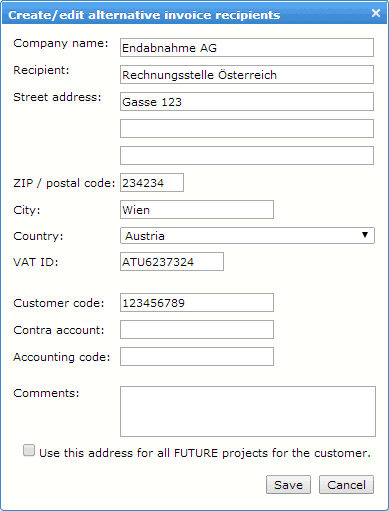
If the "Different invoice address" function is activated for the order form, customers can select or enter a different invoice recipient independently. If they do, the note "Divergent invoice address" is displayed in >Project management >Quote >Receipt of order.

2)
>Project management
>Customer portal
>Resource portal
>Administration

Success messages integrated in next page

The success page, which was displayed in OTM after most successful processing steps, has been abolished in favor of quicker continuation of work. Instead, the probably required next page is loaded immediately and the success message is displayed there. Error messages are retained in their previous form on a separate page.

3)
>Project management >Task Board
>Project management >Quote >Receipt of order
Improved purchase order workflow

The link "Purchase order received" under >Task Board leads directly to the page >Receipt of order, where all information concerning the purchase order is summarized. A request to set up a customer account can be fulfilled immediately upon activation of the order phase.

For customers, there are separate fields for "Purchase order information on the invoice" and "Comments on this purchase order".

Case 1 – Order via the online order form:
When the purchase order is received, any additional information is already contained in the corresponding target fields. Therefore, it is no longer necessary to open the order document to see this information. The same applies to the request of a customer account. All information is displayed under >Receipt of order.

Case 2 – Purchase orders that have been uploaded or extracted from an e-mail:
Here it is indicated that the order document does NOT originate from an online order. Therefore, the order document must be checked by the project manager. Any additional information must be transferred to the corresponding fields.

4)
>Project management >Project documents
>Customer portal >Project details

Purchase order document – Naming and visibility for customers

The file name of a purchase order document always contains the respective project number, where available with quotation version.
Customers can view and download the purchase order document in >Customer portal >Project details under "Purchase order sent". In a project with several quotation versions, all purchase order documents that are visible in the project management are displayed for the customer. Other project documents (which are not purchase order documents) are not available to the customer here.


5)
>Quote request form
By selecting the entry "(no information)" in the country selection customers can send an inquiry with the quote request form without entering a country.

OTM 8.7

OTM Update version 8.7 _changelog

  • Support e-mail with attachments
Read entryClose entry

Berlin, June 5, 2018


1)
>Administration >Preferences >Project management settings

Configurable request form
As a supplement in the sense of GDPR compliance, administrators decide on their own responsibility which data fields for customer information are displayed in the inquiry form and used as mandatory fields.

2)
Support e-mail with attachments
When sending support e-mails with OTM, it is possible to add screenshots or other file attachments in addition to the text information.


OTM 8.6.2

OTM Update version 8.6.2 _changelog

  • Internet address of your privacy policy
  • Full screen mode for text editor
  • Warning for different remuneration amounts
Read entryClose entry

Berlin, May 22, 2018


1)
>Administration >Settings >Core data
Internet address of your privacy policy
Enter the internet address (URL) of your privacy policy here.

2)
>Administration >Standard texts >General Terms and Conditions for Customers
>Administration >Standard texts >General Terms and Conditions for resources
>Administration >Standard texts >OTM website (texts)
Full screen mode for text editor
At the top right of the text editor toolbar there is a button for the full screen mode. This enlarges the editor to the dimension of the browser window, which makes text editing of long texts more convenient.
Exit full screen mode with the same button. The entered text is retained and must then be saved.

3)
>Project management >Jobs >Overview
Warning for different remuneration amounts
A warning message is displayed if the remuneration amount has been changed after a payable voucher has been created. In this case, the payable voucher should be recreated.

OTM 8.6.1

OTM Update version 8.6.1 _changelog

Historical entry: the DATEV add-on and SDL Trados Studio Connector are no longer part of the current offering.

Read entryClose entry

Berlin, May 15, 2018


1)
>Project management >Project finderSearch project name
In the project finder you can search for strings included in the project name, which allows for example to include a customer reference in the project name and to later search for this reference via project finder.

2)
>Resource portal >JobUpload multiple result files for one source file
Resources are now able to select more than one result file to a single source file and upload it in one go, for example if besides a translation file also a TM has to be uploaded.

3)
>Administration >Resource administration >RankingImproved ranking settings
You can optimize your basic ranking parameter settings by choosing
>Ranking >Weighing of FQA, LQA and WWA.
To do this, change the values in the fields
Weighting of the FQA average
Weighting of the LQA average
Weighting of the WWA average
and apply the new ranking parameters by choosing the function
Save parameters and re-calculate QA values.

4)
>Project managementAll OTM tabs can be opened directly in new browser tabs
The technical restriction, due to which some OTM tabs could not directly open in additional browser tabs, has been removed.

5)
"Customer portal" and "customer account" – Terminology change for customers
The term "service pages" has been replaced by the terms "customer portal" and "customer account". This affects all texts specified in OTM that are addressed to customers – for example e-mail. Possibly existing individual agency versions of these texts can be changed on agency level in
>Administration >Standard-Texts >E-Mail.

6)
>Project management >Line items Line items created with the SDL-Trados Studio wizard
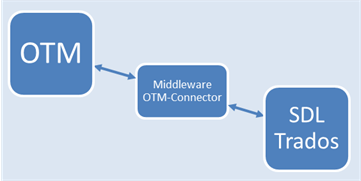
Line items created with the Trados wizard can be deleted manually when editing line items outside the Trados wizard. Such line items are no longer visible but remain saved in the Trados wizard. They will not be completely removed until they have been deleted in the Trados wizard and "Step 2" has been called up. To prevent "invisible" line items from interfering with project processing, the button of the function "SDL-Trados Studio wizard" displays the number of line items stored there.

OTM 8.6

OTM Update version 8.6 _changelog

  • Sort project files
Read entryClose entry

Berlin, April 23, 2018


1)
>Customer portal >Project files – Sort project files
Customers can sort the project files in their view by file name or alternatively by upload date.


2)
>Customer portal >Project >E-mail history
>Resource portal >Job >E-mail history
The views of the e-mail history in the customer portal and the resource portal have been made clearer and more functional.

3)
>Resource portal >Job Job files are marked when not downloaded
Resources can see at a glance in the job which source files or reference files have not yet been downloaded.


4)
>Project management >File repositoryUpload multiple files in one upload process
Project managers can select and upload multiple files in the file repository for an upload process. The same is also possible by dragging several files onto the button "Browse..." and then uploading them all at once.


5)
>Project management >Customer administration Protocol of approval
When a customer is approved, the system logs and displays who approved the customer and when.


6)
>Project management >Customer administration >Feedback Team leaders also see feedback from team members
If project manager A as team leader has access to all projects of project manager B and project manager C, then PM A also sees all customer feedback that was given for projects of PM B and PM C.


7)
>Project management > Customer administration >E-Mail address for sending invoices Multiple e-mail addresses are possible
Multiple e-mail addresses, separated by commas, can be entered in the field "E-mail address for sending invoices". If the invoice is sent by e-mail, each additional addressee receives a CC e-mail with the invoice PDF as an attachment.


8)
>Project management >Order >Generate invoice Create certificate even if the invoice is paid
Certificates can now be created even after the project is completed, regardless of whether the invoice for the project has already been entered as "paid".


9)
>Project management >Project switchboard >Identify Customer
Address data is also compared
When recognizing possible duplicates of customer data records, the address data entered is now also taken into account.


10)
>Project management >Line itemsLong selection lists with filter option
The long selection list for languages can be filtered by entering a short character string at the top of the list.


11)
>Project management >Jobs >PostThe language parameters are always displayed for the service
In addition to the respective service, the language parameters of a job are always displayed to the PM when the job is about to be posted. The warning message for deviating language pairs is still displayed.


12)
>Project management >Task board Better display of status messages
The status messages in the task board have been revised so that more space is available for less text. Thus the number of line breaks within messages is reduced.


13)
ZIP-file download 
Because the latest PHP version no longer has UTF-8 problems, when downloading ZIP files, the file names are always extracted correctly. The text file with information about the original file names could therefore be omitted and is not contained in the ZIP file any longer.


14)
Furthermore
Numerous security measures and improvements by updating technical components, as well as bug fixes.

OTM 8.5.4

OTM Update version 8.5.4 _changelog

Read entryClose entry

Berlin, February 26, 2018

Besides a few minor improvements and bugfixes the following functionality has been implemented:

>Project management >Line itemsQuicker editing of line items

If you open an existing line item by clicking the right text area of the line item, the subtab "Quantification/Price" will open immediately.

When a line item is open/in edit mode, you can directly open another line item for editing. The first line item will be saved and closed automatically.

OTM 8.5

OTM Update version 8.5 _changelog

Read entryClose entry

Berlin, January 16, 2018

1) >Administration >User accountsNew team functions available

Below the area where the roles for a user are defined, an administrator can make settings that give the user access to projects and orphaned e-mail which are assigned to other project managers. The reverse logic can be applied, as well, by granting other users access to projects of the user.

Therefore, access to the projects of other project managers does not require a supervisor role, nor does each project have to be shared individually if required.

Three application examples

a) Coaching – During the familiarization period of the new project manager X, all projects assigned to X should be visible to the colleague A. The administrator can make the appropriate setting in the user account of X, or alternatively in the user account of A. The result is that all projects and all orphaned e-mail from project manager X are also visible to project manager A.

b) Team function – There are several teams (departments) in the company. All members of a team should have access to all projects assigned to them or other team members. Instead of having to share each project individually, the basic setting is made only once, and all team members immediately see all the projects of their team.

c) Team leader – It is generally determined that a project manager always has access to all projects of certain colleagues. If this access is not reciprocal, then, apart from the team leader, all project managers are only concerned with their own projects.

In addition to the team function, a new role has been created: "Project management: Assign new projects and orphaned e-mail". Equipped with this role, the project manager sees new projects that have not yet been assigned to a PM and can assign the project. The same applies to orphaned e-mail.


2) >Administration >Preferences >Project management settings New basic setting for approving new customers

There is a new project parameter that can be set in such a way that the processing of projects of new customers can only begin when a customer has been approved by an administrator, for example, after checking the relevant customer data. For licensees who do not change this setting, the handling of the projects does not change.

In order to prevent the project of a new customer from being processed before the customer data has been verified and the customer has been approved, the basic setting in "New-customer project processing only after verification and approval" needs to be changed to "YES".

The manual approval of a customer is done by a project manager with administration rights in >Project management >Customer administration >Basic data >Properties.


3) >Project management >Bookmarks – The OTM bookmarks in the project management area can be provided with their own names.

As before, project managers, supervisors and administrators can save frequently used views including filter settings and sorting as bookmarks. These views can now also be given an individual name.


4) File names of PDF documents (project documents) for customers

A customer can receive an offer, an invoice or a credit note via OTM – either as a download or by e-mail. OTM automatically adapts the file name of the respective PDF document. The name starts with the precise description of the document in the selected project language. For example: Project language Dutch – The customer receives an invoice as "Factuur_projectnumber. pdf" and a credit note as "Creditnota_projectnumber. pdf", i. e. in a file with a name, that also appears as heading in the document.


5) >Project management >ReportsRevenues are broken down by service
In the tabs >Project managers and >Monthly results, the results are displayed broken down in individual lines under "Revenues by service".

6) >Project management >E-mail threads – OTM remembers the sorting selected by the user for all e-mail threads

If a project manager sorts the e-mail of a thread in chronological order descending, this settings is applied when opening other e-mail threads as well.


7) Minor improvements and bug fixes

2017

OTM 8.4

OTM Update version 8.4 _changelog

  • Time zone information according to resource user settings
  • https for the OTM Microsite
  • Improved assignment of outgoing e-mail
  • Minor improvements and bug fixes
Read entryClose entry

Berlin, July 31, 2017

  1. >Project management >Customer administration – New database field with optional e-mail address for receiving invoices

    For each customer company you can save a specific e-mail address for receiving invoices, e.g. "accouting@somecompany.domain".

    Project managers can insert, change, or delete this e-mail address in the customer administration.

    Through saving such an e-mail address, the setting "Invoice" in "E-mail delivery (all contacts)" will automatically be activated. This way "E-mail delivery" will be the default setting when an invoice is being generated.

    Project managers can still chose the other option, either for the customer in general, or for the individual project when generating the invoice.

    An invoice document (pdf), which is sent automatically by e-mail when it is generated, includes the sentence "This document has been sent by e-mail." at the end of the document.

    Invoices that have been delivered this way, are listed in a separate section under >Bookkeeping >Newly created.


  2. >Project management >Customer administration – E-mail delivery of invoices for customers, who have to pay in advance

    Whenever a customer is saved as having to pay in advance, the setting "Invoice" in "E-mail delivery (all contacts)" will automatically be activated. This way "E-mail delivery" will be the default setting when an invoice is being generated. The setting can be altered manually by the project manager at any time.


  3. Time zone information according to resource user settings

    In the automated deadline reminder e-mail to resources the time zone is the one that has been selected in the resource user settings instead of always UTC.


  4. >Reports >Project managers – Turnover stats according to individual services

    An additional report shows the turnover broken down to individual services.


  5. https for the OTM Microsite

    All pages of the OTM mini homepage (OTM microsite) run encrypted with certificates under "https://".
    If you communicate the URL of your OTM microsite it should start with "https".
    The old "http://" address as in "http://myls.qtn.net" is automatically re-routed to "https://".


  6. Improved assignment of outgoing e-mail

    The assignment of outgoing e-mail to OTM projects has been improved.


  7. >Task Board >Customer identification

    Up to now in certain cases it could happen that a customer identification information was displayed while no potential duplicates where listed by OTM. The unnecessary customer identification information will no longer be displayed.


  8. >Search >Customers

    When searching customers in the database the search result will include an additional column "Last order", which shows the date, when the last order for the customer has been placed.
    This column is not yet part of the export option for customer data.


  9. Minor improvements and bug fixes

OTM 8.3

OTM Update version 8.3 _changelog

  • A timestamp is recorded for the rejection of a job offer and displayed under >Jobs >Overview.
  • The performance of the customer portal has been optimized particularly for customers who have many archived projects.
  • In the Project management section the display and performance of >Task board, >Quotations, >Orders, and >Bookkeeping >Newly created have been improved.
  • Minor improvements and bug fixes
Read entryClose entry

Berlin, June 27, 2017

  1. When using resources from Internet job portals the payment process is often part of the interaction on these portals. If this is the case, there is no need to create payable vouchers with OTM, and from the perspective of accounting it might even be counterproductive.

    To be able to record the costs of such projects in OTM, there is the option "Only record the costs" in the resource administration. By creating "virtual resources" with this setting and by directly assigning jobs to them, the costs will be displayed correctly and recorded in the OTM reports section without having to generate payable vouchers.

    The setting "Only record the costs" can be made under
    >Administration >Resources … >Preferences.

  2. A timestamp is recorded for the rejection of a job offer and displayed under >Jobs >Overview.
  3. The performance of the customer portal has been optimized particularly for customers who have many archived projects.
  4. In the Project management section the display and performance of >Task board, >Quotations, >Orders, and >Bookkeeping >Newly created have been improved.
  5. Minor improvements and bug fixes

OTM 8.2

OTM Update version 8.2 _changelog

  • Resources who have registered an IBAN for bank transfer no longer have to register another bank account number.
  • Various bug fixes and improvements
Read entryClose entry

Berlin, May 22, 2017

  1. >Project managers
    The file attachment of an e-mail in the customer thread can be copied directly into the file repository or the project documents or the customer documents. The same is true for attachments of e-mail in a resource thread.
  2. >Project managers
    All resource responses to job postings are shown in >Task board and in >Jobs >Overview.
    The notes which indicate new resource responses no longer automatically disappear from the >Task Board once the project manager has opened >Jobs >Overview. They have to be removed manually instead, which can be done either on the >Task board or on >Jobs >Overview.
    As the notes are shown on the Task Board and can be removed from there, the project manager can spare the time for opening >Jobs >Overview without missing any necessary information.
  3. Resources who have registered an IBAN for bank transfer no longer have to register another bank account number.
  4. Various bug fixes and improvements

OTM 8.1

OTM Update version 8.1 _changelog

  • Resources' e-mail
  • Small improvements
  • Improved user interface design of the new customer portal with updated color scheme.
  • In >Project managers >Jobs >Overview the timestamp of each individual job posting is available on mouseover on the job postings status information.
  • Files in the >File repository will always be sorted according to the last settings of the user.
Read entryClose entry

Berlin, March 22, 2017

1) Resources' e-mail

On the right side of >E-Mail >Resources, there is an additional list of all unread resource e-mail. The status of one or all e-mail can be changed to "Read" immediately.

2) Small improvements

  1. Improved user interface design of the new customer portal with updated color scheme.
  2. The IBAN country list has been updated. More countries (e.g. Ukraine) can be used with an IBAN account.
  3. In >Project managers >Jobs >Overview the timestamp of each individual job posting is available on mouseover on the job postings status information.
  4. Each customer who is being asked for a project feedback receives an e-mail including a link to the online feedback form. (Until now only customers without access to the customer portal have received this e-mail, while customers with access to the portal where asked for their feedback only when logged into the portal.) The feedback option in the customer portal remains active.
  5. Files in the >File repository will always be sorted according to the last settings of the user.

OTM 8.0

OTM Update version 8.0 _changelog

  • OTM customer portal (customer service pages) | Redesign
  • Customer portal | Archiving of projects
  • Customer portal | Automatic archiving of projects
  • Feedback form for customers
  • >Project Manager >Order >Invoice Warning when VAT ID is missing
  • >Project manager >Task Board No unnecessary E-Mail alert
  • >Project manager >Project >Project documents Archiving of earlier versions of invoices and credit notes
  • >Project manager >Customer administration >Properties >Online order form (with and without login)
  • >Project manager >Orders Display of the payment status of payment requests
  • Various bug fixes and improvements
Read entryClose entry

Berlin, January 30, 2017

1) OTM customer portal (customer service pages) | Redesign

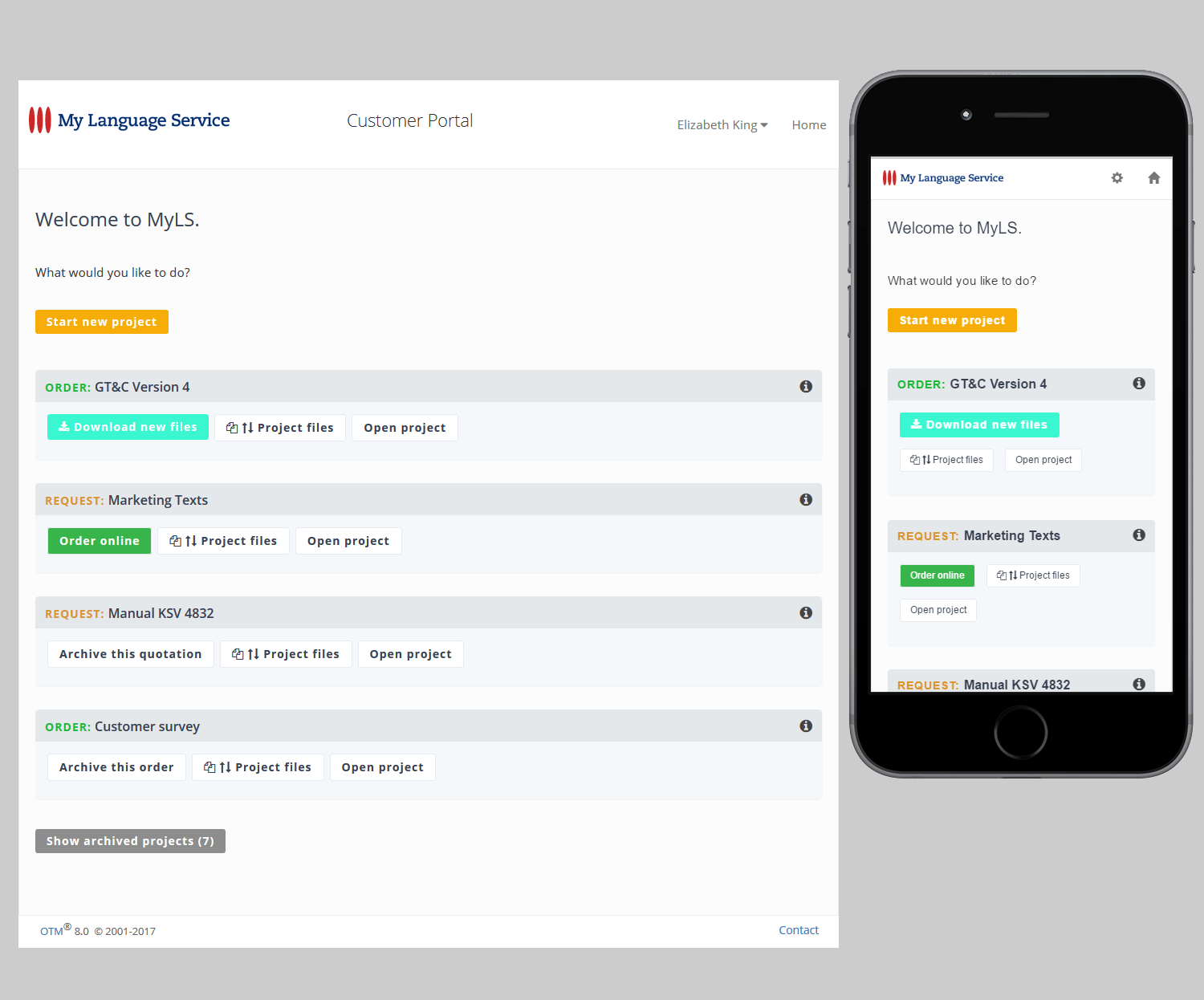
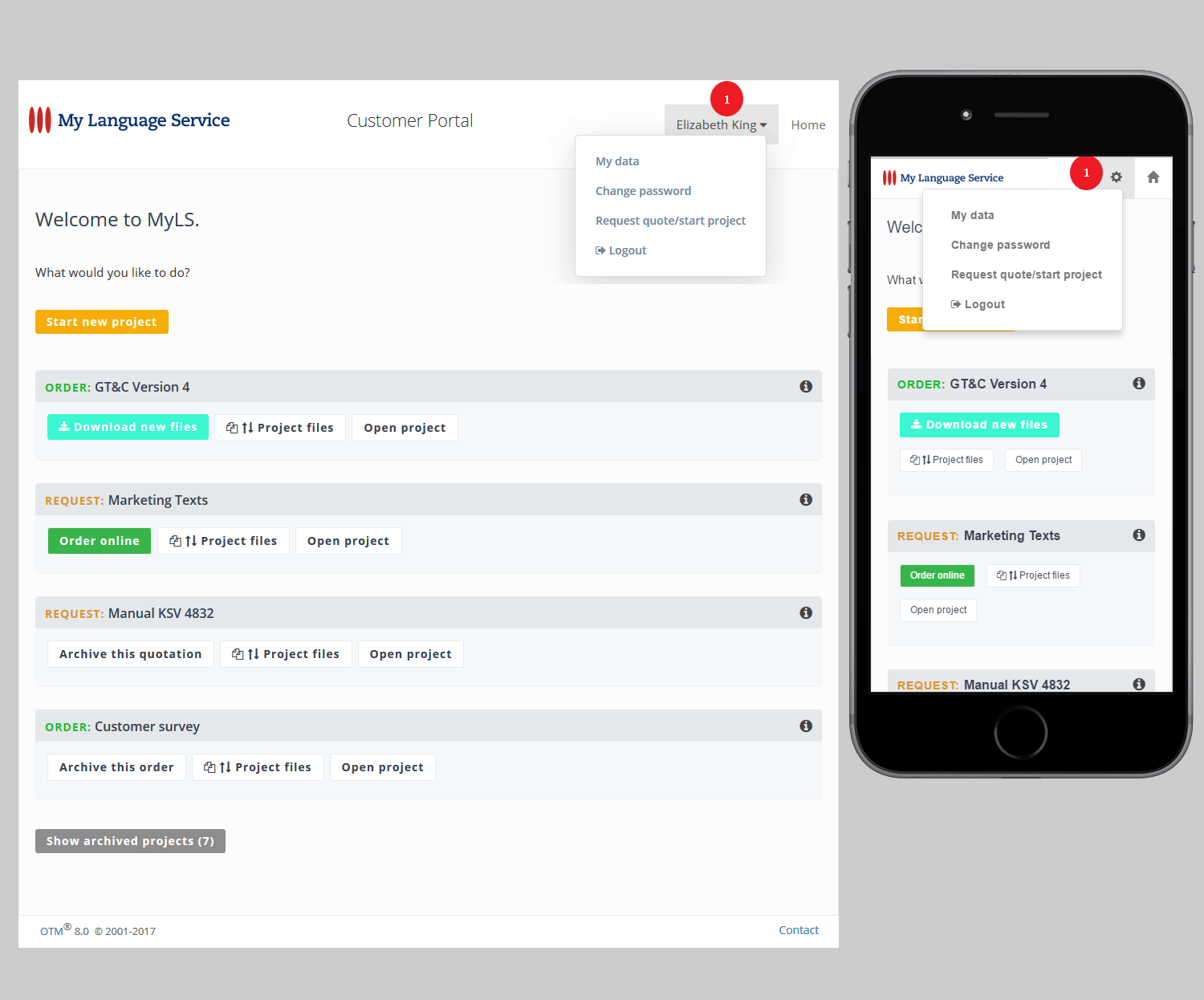
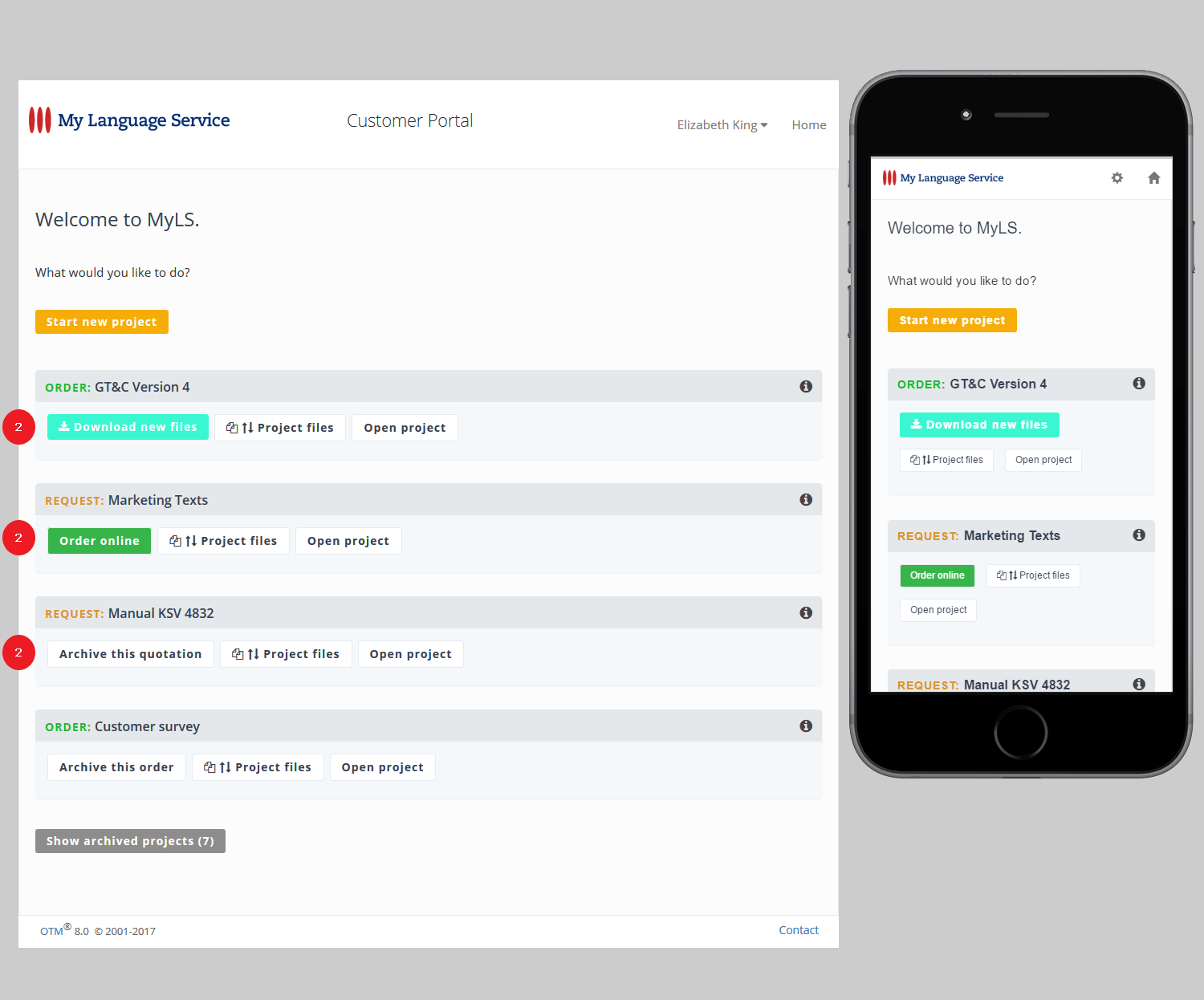
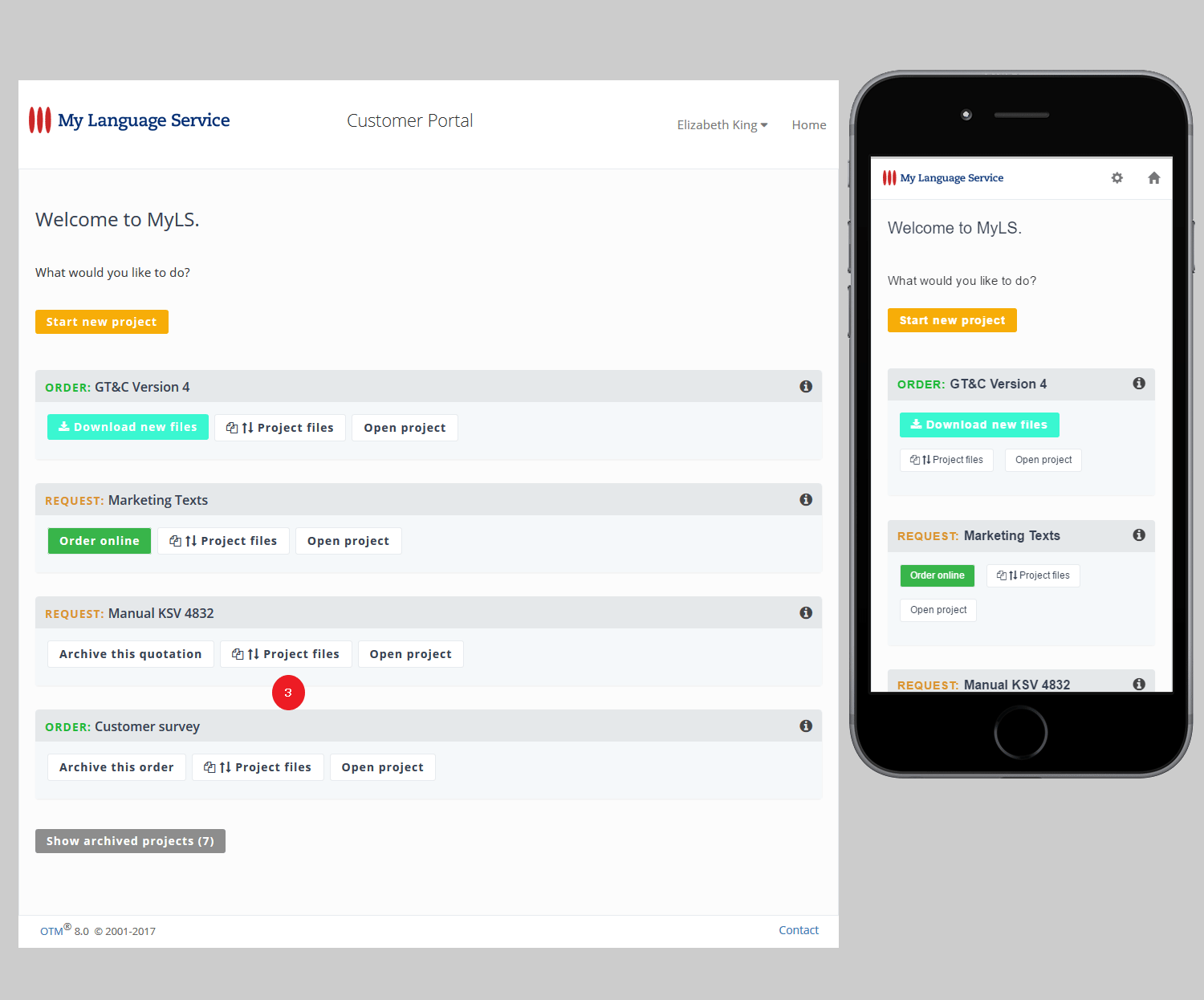
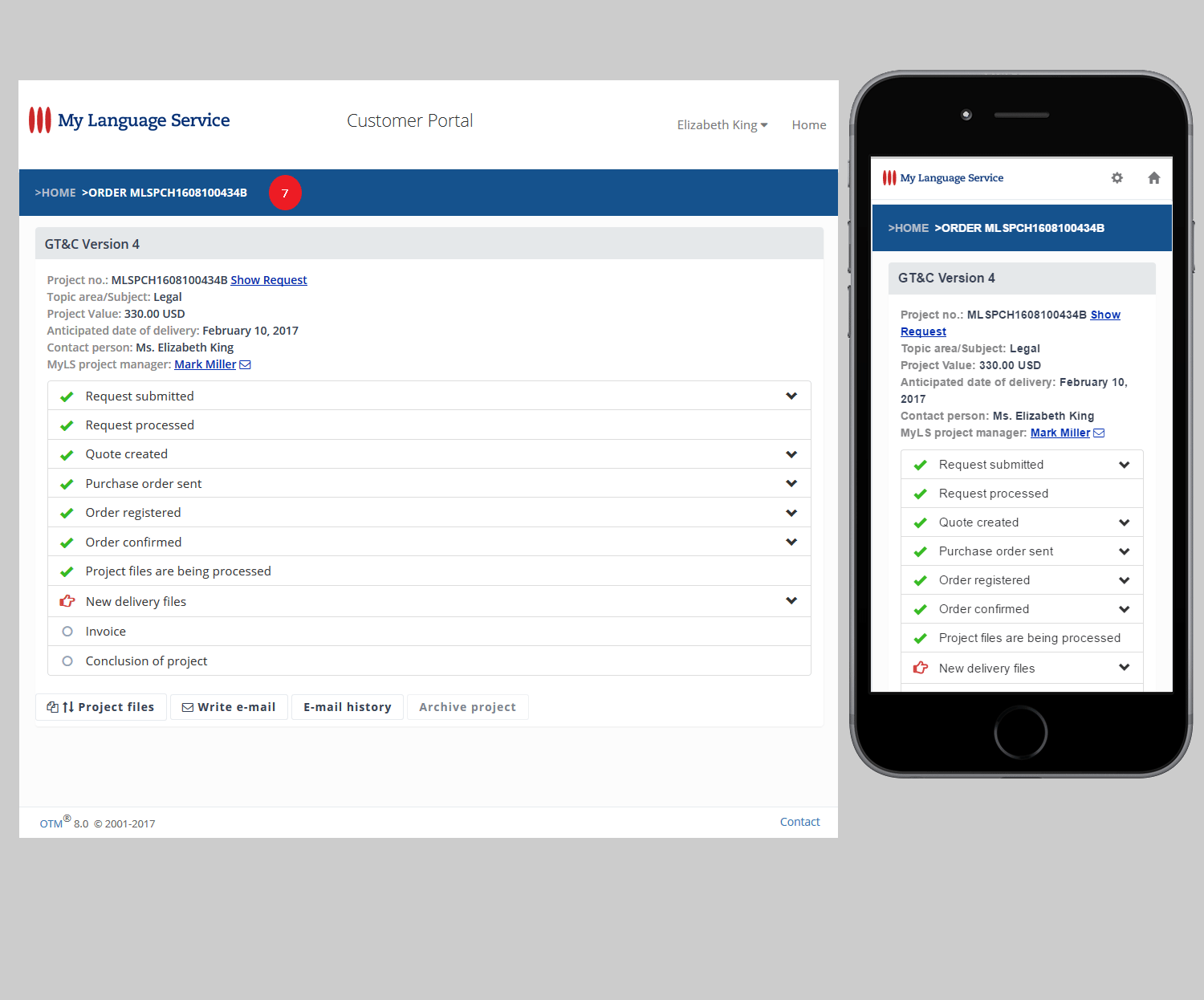
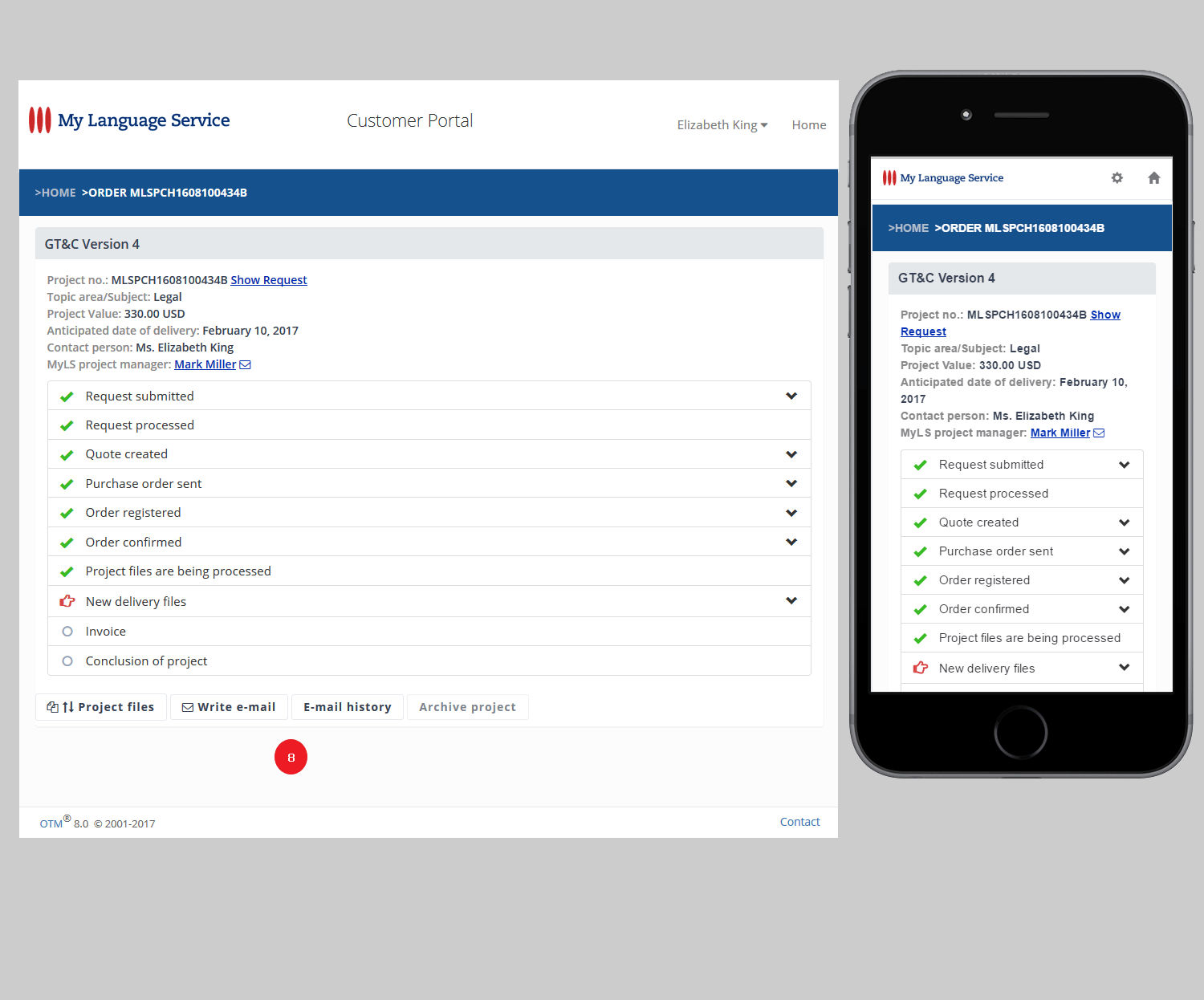
The customer portal has been completely redesigned and has received a "Responsive Design". This allows customers to still use OTM on the PC with the browser, but also if necessary with the smartphone or tablet.

With the redesign, emphasis was put on a clear, compact and intuitive user interface. See reference at http://lsp.net/kb/otm-customer-portal-en.html

2) Customer portal | Archiving of projects

In the customer portal, "archiving" means that a project is no longer in the list of "current projects", but under "archived projects".

To keep the list of "current projects" clear, customers can archive projects under certain conditions:
(A) requests for which no purchase order has been issued, and
(B) orders concluded by the project management and for which no open operations exist (such as delivery files which have not been downloaded).

3) Customer portal | Automatic archiving of projects

Provided that the conditions described in the previous section are fulfilled, projects are being archived automatically:
(A) if a request is older than one and a half years, and
(B) if an order was completed by project management at least one year ago.

4) Feedback form for customers

Together with the customer portal, the feedback form for customers has been updated. Customers can submit reviews from "very good" to "bad" and leave a comment. Ratings and comments can be published together with the customer barometer.

5) >Project Manager >Order >Invoice
Warning when VAT ID is missing

If your company is located in an EU country and you create a customer credit note for a customer in the same country, you will receive a warning if no VAT ID of the customer is stored.

(Tax authorities could possibly refuse recognition of the VAT credited to the customer if the customer's VAT number is missing).

6) >Project manager >Task Board
No unnecessary E-Mail alert

If a customer orders via the online order form without logging into a customer account, then the e-mail confirmation of the order is no longer displayed under >Task Board as "New E-Mail".

The setting for sending the order confirmation e-mail is made in
>Administration >Preferences >E-Mail options as well as in >Project manager >Customer administration in the same way as the settings for sending the other e-mail are made.

7) >Project manager >Project >Project documents
Archiving of earlier versions of invoices and credit notes

If an invoice or customer credit note is being regenerated, the previous version will not be overwritten, but saved in >Project Manager >Project Documents. In this way, all versions are traceable at any time.

8) >Project manager >Customer administration >Properties
>Online order form (with and without login)

If other terms apply for a customer than your GTC, then the customer no longer has to agree to the terms and conditions in the online order form. However, if an optional text has been saved instead, the customer must agree to that.

In the customer administration, information can be stored for each customer whether the standard GTC is to be applied or not. If the General Terms and Conditions are not applicable, an optional note may be stored in an optional text area, for example, regarding applicable purchasing terms or a specific contract.

9) >Project manager >Orders
Display of the payment status of payment requests

For orders to which a payment request has been generated, the payment status is already displayed on the overview page >Orders in the "Invoice" status field.

10) Various bug fixes and improvements

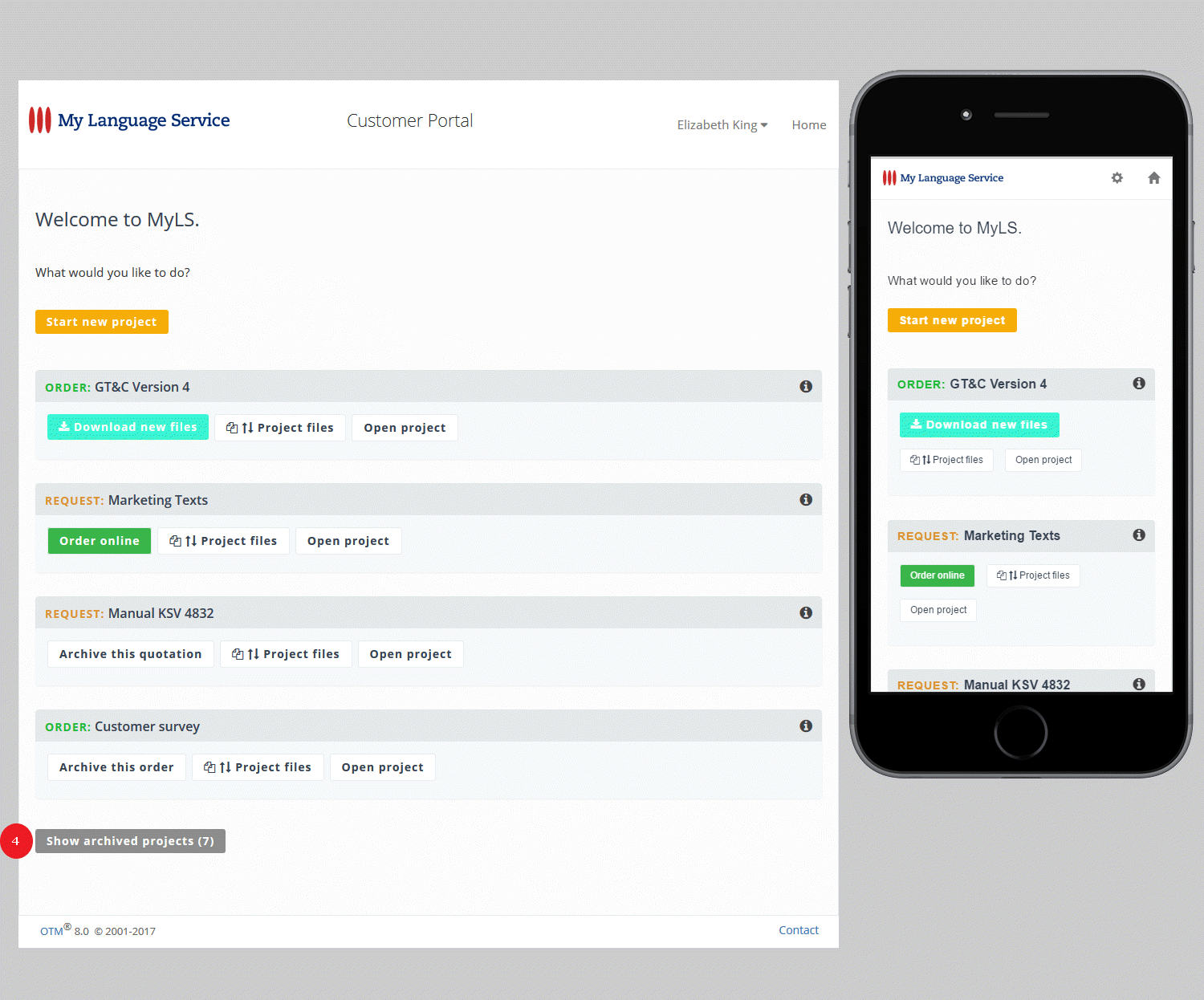
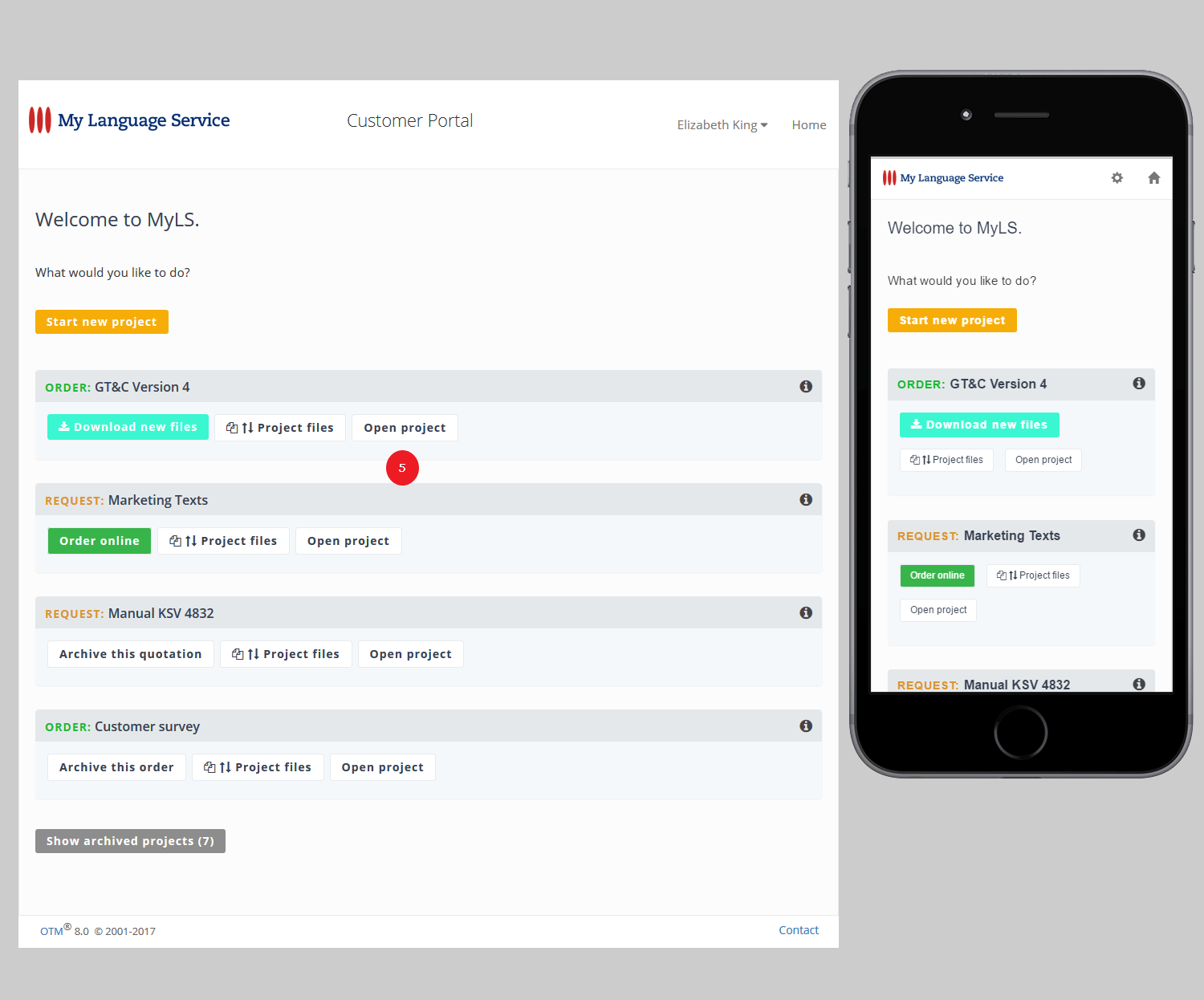
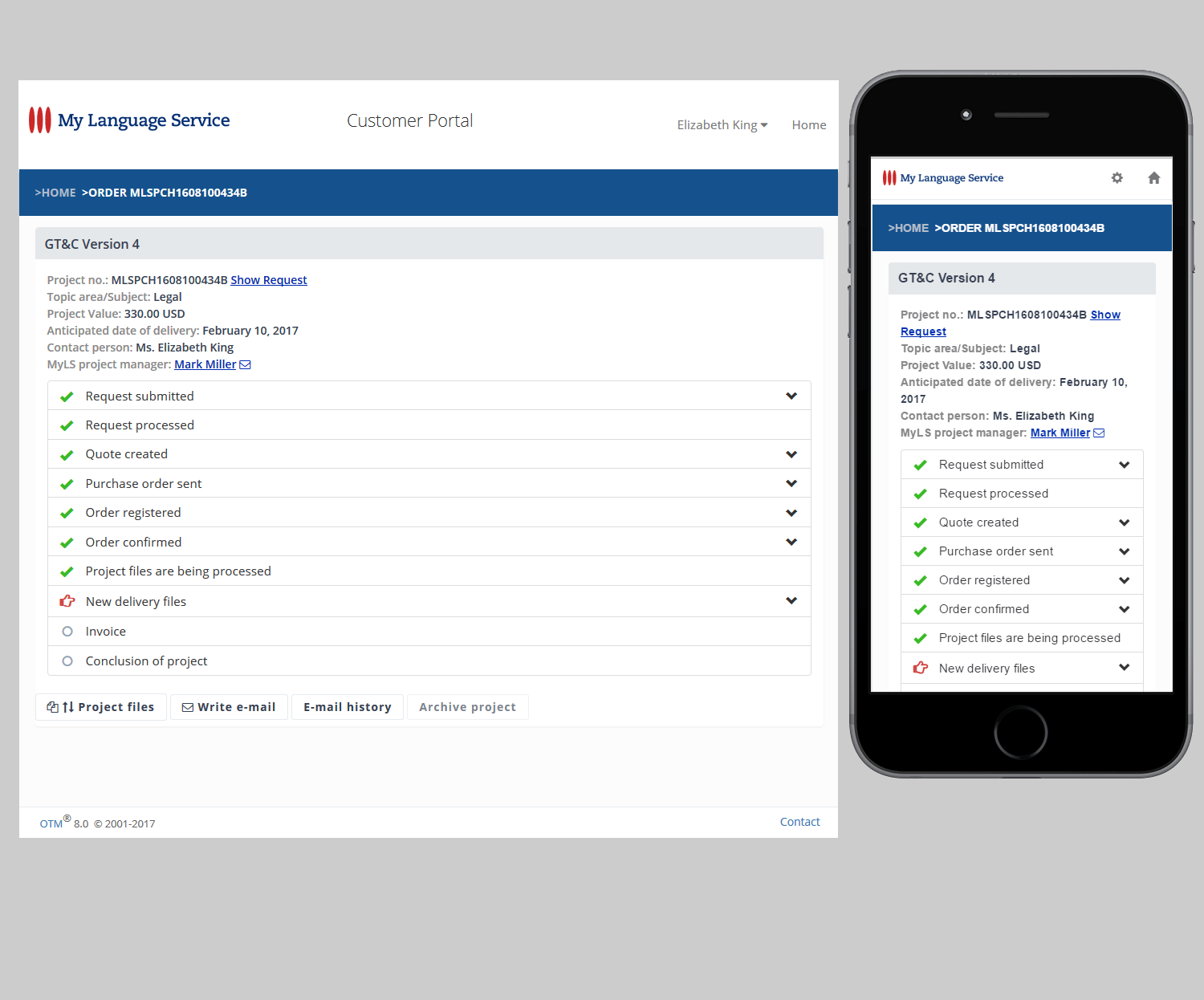
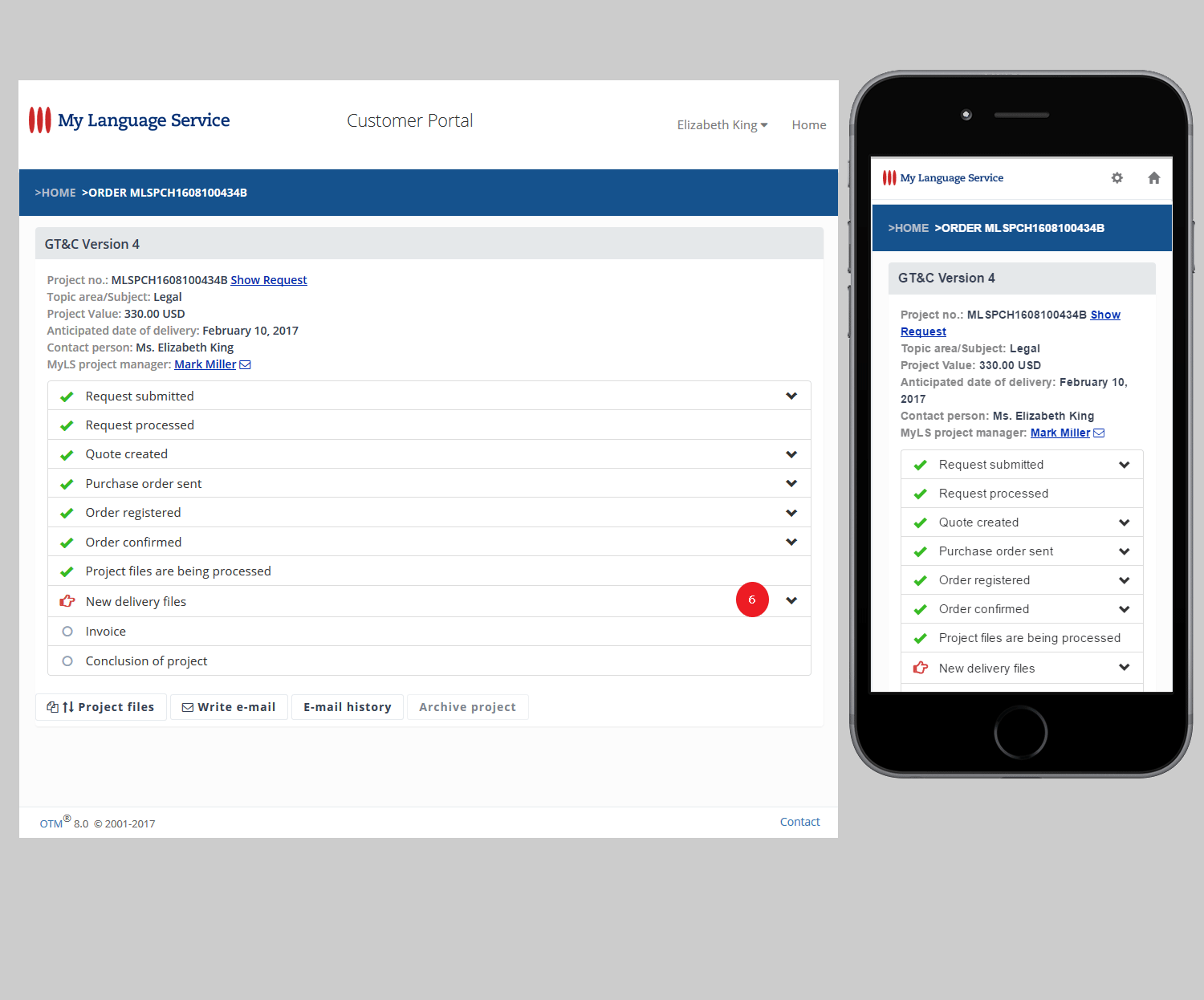
Historical customer portal screenshots

Original illustrations from the historical linked documentation. Select an image to view it at full size.

Customer portal overview
Settings and login details
Actions for current projects
Upload and download project files
Archived projects
Archived projects
Open a project
Open a project
Project information overview
Details of individual project steps
Navigation within a project
Messages and email history

Historical detailed documentation

2016

OTM 7.9

OTM Update version 7.9 _changelog

  • Every customer can order online – even without having an account to the customer portal
  • Customers who have a customer portal account can receive a download link
  • Project managers can hide rarely used text blocks
  • A new parameter for bookkeeping
  • View and handling of bookkeeping parameters
  • Project managers can edit the status "New" of files in the file repository and in job files
  • Project managers can switch the e-mail status "Unread" and "Read"
  • The "Date of customer order" cannot be in the future

Historical entry: the DATEV add-on and SDL Trados Studio Connector are no longer part of the current offering.

Read entryClose entry

Berlin, November 1, 2016

1) Every customer can order online – even without having an account to the customer portal

>Project management >Quotations >… >Conditions/options
>Administration >Preferences >Project management settings

A project manager can communicate the link of an online order page which does not require the user name or password from the customer. The purchase order the customer generates on this page does not authenticate the user. The customer can order without having to sign in.

This function can be activated in  >Administration >Preferences >Project management settings >Online order without customer portal. The default setting for quotations is done at the same location under >Quote preferences.

2) Customers who have a customer portal account can receive a download link

>Project management >Orders >… >File delivery

Until this update, customers registered with a customer portal account had to sign in so that they could download their delivered files. From now on, project managers have the additional option to communicate a download link which does not require the customer to sign in.

The link is visible for project managers underneath the text area of the file delivery e-mail page. This link is to be communicated cautiously, because - if for instance transmitted by e-mail – it can no longer be regarded as confidential information.

3) Project managers can hide rarely used text blocks

>Project management >Quotations >… >Conditions/options

The view of the text blocks has been condensed. In addition, project managers can individually hide text blocks which they rarely use. These text blocks remain accessible in an extra section at the end of the list, from where they can be moved back into the list at any time.

4) A new parameter for bookkeeping

>Project management >Customers >… > General customer data
>Administration >Resources >… >Master data

An additional field "Posting key" has been added to the core data of customers and resources.

Using this field, OTM can create DATEV-XML export packages. Licensees who do not use DATEV can of course use this additional 20 character field according to their individual accounting software requirements.

5) View and handling of bookkeeping parameters

>Project management >Bookkeeping

With the introduction of the field "Posting key" the user interface under >Invoices and under >Accounts payable vouchers has been updated. The edit box offers direct access to the core data of customers and resources while working on invoices and payable vouchers, this way sparing the extra work of finding and editing the core data of customers or resources.

6) Project managers can edit the status "New" of files in the file repository and in job files

>Project management >Quotations >… >File repository
> Project management >Orders >… >File repository
> Project management >Orders >… >Job files

Every project manager with access to a particular project can set or remove the status "New" of files in the >File repository and in >Job files. This enhances the communication in projects that are shared between multiple project managers, as it allows the project manager to influence which project and which event is shown in the >Task board.

7) Project managers can switch the e-mail status "Unread" and "Read"

>Project management >Quotations >… >E-mail
>Project management >Orders >… >E-mail

Every project manager who has access to a project can manually switch the status of project related e-mail between "Unread" and "Read". This enhances the communication in projects that are shared between multiple project managers, as it allows the project manager to influence which project and which event is shown in the >Task board.

8) The "Date of customer order" cannot be in the future

>Project management >Quotations >… >Receipt of order

As it can cause major problems in the creation of invoices project managers are no longer able to save a "date of customer order" that is in the future. The date can still be backdated in order to compensate the delayed processing of a customer order and show the correct transmission date of the purchase order - for example after a weekend or holiday.

OTM 7.8

OTM Update version 7.8 _changelog

  • Sharing and delegating projects
  • Shared handling of a project
  • Parallel work requires extra attention
  • Visibility of delegated and shared projects
  • Sharing of delegated projects
  • Trados Wizard now considers Trados "Locked Segments"
  • Various bug fixes and improvements

Historical entry: the DATEV add-on and SDL Trados Studio Connector are no longer part of the current offering.

Read entryClose entry

Berlin, July 15, 2016

  1. Sharing and delegating projects

    There are two additional rights for project managers in >Administration >User administration.

    All users with the role of supervisor or admin have these rights by definition, even if the new roles are not explicitly activated. You can optionally assign these rights to any project manager by activating the roles “Project management: Share own project” and/or “Project management: Delegate project”.

    A) The right to share projects with other project managers

    A project manager who has been assigned the role with this right can share his own projects with other project managers (Co-PMs). Supervisors don’t have to interact in order to initiate or end the sharing.

    B) The right to delegate projects

    A project manager who has been assigned the role with this right can delegate a project to another project manager. Once a project has been delegated, the project manager to whom the project has been delegated is responsible for the project. When the delegation of a project ends, the project manager originally in charge of the project resumes responsibility.

    Shared handling of a project

    In addition to the project manager in charge of a project, the project can be shared with Co-PMs. Thus multiple PMs can work together without having to switch the project back and forth. Sharing a project allows parallel editing of different services/languages by two or more project managers. By granting a more experienced project manager access to the project of a new colleague, the project can be used for training the new project manager, for example.

    Parallel work requires extra attention

    All project managers participating in the editing and handling of a project need to maintain close communication their activities. Parallel editing of identical data can lead to the data loss or inconsistencies. All project managers involved with the project must consult each other and proceed as agreed.

    Project owner

    The project manager to whom a project has been assigned or delegated. There is only one project owner at any given time.

    Co-PM

    A project manager with whom a project has been shared and who therefore has access to the project. The Co-PM can edit the project within the limits of the roles and rights assigned.

    The project owner responsible for a project is usually the project manager to whom the project has been assigned.

    If the project has been delegated, the project manager to whom the project has been delegated becomes project owner and then bears responsibility for the project until delegation of the project has ended.

    The main responsibility for a project that is being shared with one or more Co-PMs remains with the project owner. The Co-PMs can access the project and act within the same limitations that apply for their own projects.

    The project owner has to communicate all events and changes relevant for Co-PMs. Whether and for how long a notification is shown in the >Task board usually depends on the project owner's reaction to the notification. In most cases, the notification expires and vanishes once the project owner has acted. Therefore Co-PMs need the project owner to forward such information.

    Visibility of delegated and shared projects

    1. For users with the role of supervisor or admin, each shared or delegated project is visible – as is every other project.
    2. A Co-PM can see all projects that are shared with them on the overview pages >Task board and >Quotations or >Orders.
    3. Shared projects are marked with a background color. There is also an extra filter "Shared" in >Quotations and >Orders.
    4. In addition to the PMs short name the central project information in the project bar includes a plus-sign and the names of the Co-PMs. Example: PM1 +PM2+PM3
    5. If a project has been delegated, the project manager the project has been delegated to is shown in addition to the original project manager. Example: PM2 < PM1
    6. A project that has been delegated is no longer visible to the project manager to whom the project had originally been assigned (unless the project manager has the role of supervisor or admin).

    Sharing of delegated projects

    Project managers without the role of supervisor or admin cannot see or access a project that has been delegated by them to somebody else. If the original project manager is supposed to keep working in this project, then the project must be shared with them as long as the project remains delegated.

  2. Trados Wizard now considers Trados "Locked Segments"

    In SDL Trados Studio 2014 and later versions, the XML analysis file contains tags for "Locked Segments" by default. The Trados Wizard now considers these segments.

  3. Various bug fixes and improvements

OTM 7.6

OTM Update version 7.6 _changelog

  • Customer Management – Industry Sector Information with Tags, Dossier
  • Search Customers
  • Identify customer
  • Online-order
  • Optional additional text on payable vouchers
  • Various bug fixes and improvements
Read entryClose entry

Berlin, March 2, 2016

  1. Customer Management – Industry Sector Information with Tags, Dossier

    a) The field with Industry sector information has been moved from General customer data to Properties.

    b) To enter or change the Industry sector information, you can use a tagging mechanism which allows you to access all tags that have previously been stored for other customers.

    You can enter those tags by mouse click, thus preventing different notations or misspellings and improving your search results.

    New tags in Industry sector information will be stored once you enter a string with a semicolon at the end. When you click on the industry sector tag list, you will also see how many times you have applied each tag to your customers.

    c) In addition to the Industry sector information there is another text field called Dossier. Hence there is more room to straighten out different kinds of information that so far had to be stored altogether in Notes regarding customer. It may, for example, make sense for you to store general and operative information for project managers in Notes regarding customer while special business information for accountants can be stored under Dossier.

    d) On the overview pages (>Task board, >Quotations, >Orders), when you move the mouse over the company name of a customer, all the text that is stored in Notes regarding customer, Industry sector information, and Dossier will be displayed on the screen. The Notes regarding contact will be displayed when you move the mouse over the name of the customer’s contact person.

  2. Search Customers

    If you sort the search results in >Customers >Search by company name, the results will be grouped showing the company name and industry sector information only once (with all contact persons).

    This way it is easier to identify duplicate customer records. In addition to the number of contact persons, the number of different customers/companies that are included in the result list is also displayed.

    The search parameters used in the last search will remain stored for a modified search.

  3. Identify customer

    a) The algorithm used to compare the customer record of new quote requests to customer records of previous projects has been improved and is more effective in cases of misspellings and fuzzy similarities.

    b) The customer identification page offers more functionality and the user interface shows clearer options for the assignation of a new quote request and the included customer record.

    c) In order to avoid unnecessary customer identification processes, there is a Graylist for e-mail domains in the administration section. E-mail domains that you put on this list -- e.g. domains of mass e-mail providers such as gmail.com – will reduce the need for carrying out customer identification processes based on an identical e-mail domain.

    For detailed information, please read the OTM whitepaper "Identify Customer" here.

  4. Online-order

    For customers using the customer portal (service pages) the option to issue an online order is now available for each active quotation, even if the customer’s service pages have only been activated after the quotation has been sent. It is no longer necessary to generate a new version of the quotation because of a change in the ordering options.

  5. Optional additional text on payable vouchers

    You can now save an optional additional text that you want to be included in your accounts payable vouchers. This text is placed underneath the sum of each payable voucher. It can for example include Information like “Payment period according to GT&C” or “Date of required payment: 30 days starting with date of this voucher”.

    >Administration >Preferences >Accounts payable vouchers

  6. Various bug fixes and improvements

2015

OTM 7.4

OTM Update version 7.4 _changelog

  • Small GUI change
  • Customer history: new icons and status information
  • Various bug fixes and improvements
Read entryClose entry

Berlin, December 17, 2015

  1. Small GUI change

    The label “Project notes” in the overview pages >Task Board, >Quotations and >Orders has been moved to the header of the table in order to make room for more of the actual information.

  2. Customer history: new icons and status information

    The H-Icon with the link to a customer’s history is now grey and deactivated if there is no project in the history other than the one in the current context. The H-icon of a new customer is shown with a slightly colored frame.

    The project history of a customer will include more specified status information. For example what used to be “Status: Order” will now be presented as “Order (running)” or “Order (finished)”.

  3. Various bug fixes and improvements

OTM 7.3

OTM Update version 7.3 _changelog

  • Improvement on selecting resources for a job posting
  • Project managers see additional information in customer's project history
  • Improvement on addressing e-mail to customers
  • List of resource invoices
Read entryClose entry

Berlin, November 9, 2015

  1. Improvement on selecting resources for a job posting

    The job count number (total jobs) of resources who have already worked for the regarded customer is now colored orange.

    Move the mouse over this number and you will see in which time period the resource has handled how many jobs for the customer and how many jobs for the current contact person.

  2. Project managers see additional information in customer's project history

    a) The areas of specialization are indicated for each project.

    b) If a customer complaint has been recorded regarding a particular project, this project is clearly marked with the text “Customer complaint”.

  3. Improvement on addressing e-mail to customers

    The additional options for addressing e-mail to customers have new text labels, a more compact layout and additional help texts.

    >Project switchboard >Addressing of e-mail

  4. List of resource invoices

    For agencies working with resource invoices (not with credit notes), only:

    You now get a list of all resource invoices which the resources have so far failed to generate.

    In order to see the list go to >Bookkeeping >Accounts payable vouchers and click >Requested resource invoices.

    Once a resource has generated the resource invoice it will appear under >Bookkeeping >Accounts payable vouchers as any other resource invoice that has been generated.

OTM 7.1

OTM Update version 7.1 _changelog

  • Resource administrators can deactivate parameters such as particular services, languages, or areas of specialization for each individual resource
Read entryClose entry

Berlin, June 15, 2015

  1. Resource administrators can deactivate parameters such as particular services, languages, or areas of specialization for each individual resource

    >Administration >Resource administration >Services and
    >Administration >Resource administration >Areas of specialization

    HR Managers and administrators who have the permission necessary to administer resources can now deactivate certain parameters for each resource on an individual basis. They can, for example, block a specific language pair in a specific area of specialization for a particular resource.

    The resource affected by this block will then no longer appear in result lists that are based on a search in which this parameter is a criterion.

    The blocking of such a parameter does not affect the resource's setting regarding this parameter.

    A parameter blocked in this manner can be unblocked at any time by the HR manager / administrator.

OTM 7.0

OTM Update version 7.0 _changelog

  • The most extensive changes and additions relate to the display and evaluation of quality assessment.
  • Various bug fixes and improvements
Read entryClose entry

Berlin, May 11, 2015

  1. The most extensive changes and additions relate to the display and evaluation of quality assessment.

    >Administration >Resource administration >Ranking
    Setting basic parameters for quality assessment.

    >Project management >Search >Resources and
    >Project management >Jobs >Post

    In the search results, the values for LQA and WWA are now displayed.

    As you move the mouse over the individual values, information will be displayed about each piece of data. If you sort the results with OTM-Rank (descending), all parameters will be taken into account in accordance with the settings in the admin interface.

    >Resource Profile (Details pop-up window)

    The average values of the quality assessments are shown in the header area. The individual criteria are broken down. All individual ratings are displayed as jobs in the QA tab where you can also see the ratings for the individual files.

    >Project management >Files >Job files

    Improved design of the input screens for the evaluation of files.

    Extensive background information:
    English: http://www.lsp.net/quality-assurance-with-OTM.html
    German: http://de.lsp.net/qualitaetssicherung-mit-OTM.html
    Spanish: http://www.lsp.net/control-de-calidad-con-OTM.html

  2. >Administration >Resource administration >Resources >Preferences

    Administrators and HR managers can activate the option “Prioritize with Search / Selection” for a resource. The resource will thus be ranked independently of the quality assessment for OTM-Rank (descending). This option allows you to promote certain resources and thereby increase the use of these resources in order to treat them, for example, as 'trainees' to a company.

  3. >Task Board >Quotations >Orders

    The project notes are now displayed for each project on the overview pages so that you do not have to open each individual project. The job deadlines are also displayed now for orders.

  4. >Search >Customers

    Improved display of settings and search criteria.

  5. >Search >Resources

    Improved display of settings and search criteria. Pre-defined shortcuts now allow you to more quickly choose common languages.

  6. >Order >Generate invoice

    If a project initially created a partial invoice, then the default for the following statement in this project is also "partial invoice". Thus, in projects where partial invoices exist, the accidental creation of final accounts, which prevent the continuation of the project with further partial invoices, can be avoided.

  7. >Bookkeeping > Export bookkeeping

    The VAT IDs can now be added to the export templates for document lists of invoices and accounts payable vouchers.

  8. >Resource pages

    Resources now see a complete list with both upload date and comment on all result files that have been uploaded while working on a project.

  9. Various bug fixes and improvements

Product news

ISO 9001 Recertification

Read entryClose entry

Berlin, February 2, 2015

LSP.net GmbH has been sucessfully recertified to ISO 9001.
The new certificate is valid thru April 2018.

2014

OTM 6.5.1

OTM-Update auf Version 6.5.1

  • Einhalten von Vertraulichkeitsvereinbarungen
  • OTM-E-Mails als ungelesen markieren

Original article in German; English version unavailable.

Read entryClose entry

Berlin, 21. Mai 2014

  1. Einhalten von Vertraulichkeitsvereinbarungen

    Wenn mit einem Kunden Verträge zur Vertraulichkeit bzw. Geheimhaltung abgeschlossen sind, können die Projektdateien des Kunden im OTM-Datei-Pool auf „classified“ gesetzt werden. Damit erhalten die betreffenden Dateien einen entsprechenden Zusatz im Dateinamen und die am Projekt beteiligten Ressourcen werden auf besondere Geheimhaltung verpflichtet (z.B. müssen Ressourcen alle Projektdateien nach Projektabschluss von ihren Computern löschen).

    Damit Vertraulichkeitsvereinbarungen (z.B. NDA, SLA etc.) zwischen OTM-Nutzern, Kunden und Ressourcen dauerhaft eingehalten werden, gibt es ab OTM Version 6.5.1 in der OTM-Kundenverwaltung die Funktion „Immer Dateien auf vertraulich (classified) setzen“. Wenn diese Funktion für einen Kunden aktiviert ist, dann werden alle Dateien, die für diesen Kunden in den Datei-Pool hochgeladen werden, automatisch auf „classified“ gesetzt.

    Dateien des Kunden auf classified setzen

    Hinweis: Dies gilt für alle Dateien, die den Projekten des Kunden ab dem Zeitpunkt der Aktivierung der Funktion hinzugefügt werden. Bereits vorhandene Dateien in Projekten des Kunden werden durch die Aktivierung der Funktion nicht verändert.

  2. OTM-E-Mails als ungelesen markieren

    Der Status von E-Mails in der Kommunikation mit Kunden oder Ressourcen kann auf „ungelesen“ gesetzt werden. Danach wird das betreffende Projekt wieder auf der OTM-Aufgabenseite angezeigt.

    E-Mails auf "ungelesen" setzen

OTM 6.5

OTM Update 6.5

  • PayPal Button for invoices and payment requests
  • EU: Notice for reverse taxation
  • Improvements in using alternative invoice recipients
  • Et cetera
Read entryClose entry

Berlin, April 28, 2014

OTM 6.5 includes improvements of the customer administration and communication plus adjustments in line with the turnover tax (VAT) legislation of the European Union.

  1. PayPal Button for invoices and payment requests

    OTM licensees can now offer customers the option to settle invoices, partial invoices and payment requests directly with PayPal. A PayPal button is integrated in the relevant PDF documents for this.

    OTM PayPal Button

    Details about the OTM PayPal Button        

  2. EU: Notice for reverse taxation

    The European Union has expanded the directives for issuing documents relevant to VAT (invoices and credit notes). The addendum states that under particular conditions documents within the EU must include a notice for reverse taxation.

    Details about the OTM module "Reverse taxation in the EU"   


  3. Improvements in using alternative invoice recipients
    Abweichende Rechnungsempfänger

    Multiple alternative invoice recipients can be saved for a customer. An alternative recipient can also be indicated as the default recipient.

    The use of an alternative invoice recipient may possibly require changes in the tax setting (VAT, for example) for the project. In this case, OTM displays a warning before the document is generated.

    Invoices issued to an alternative invoice recipient are marked with a color to indicate this in the OTM accounting module.

    Details about the OTM feature "Alternative invoice recipients"  
              

  4. Et cetera

    Bug fixes and a few improvements of details.

Historical accounting view

Original illustrations from the historical linked documentation. Select an image to view it at full size.

Alternative invoice recipients highlighted in accounting (German interface)

Historical detailed documentation

2013

OTM 6.0

OTM Update 6.0

Historical entry: the DATEV add-on and SDL Trados Studio Connector are no longer part of the current offering.

Read entryClose entry

Berlin, July 3, 2013 – Another outstanding feature has been added to the Online Translation Manager in the OTM 6.0 update:

The OTM SDL Trados® Studio Wizard

The wizard enables project managers to process Trados XML analysis files, apply weighting factors and use the results for line items in quotations or invoices.

This completes the integration of SDL Trados Studio in OTM, which began in 2012 with the development of the CAT Weighting Tool. Experience acquired with the weighting tool was applied to OTM, and options to produce line items from the Trados analyses were added.

The OTM SDL TRADOS Studio Connector for Windows was created in parallel in a collaborative effort with consultant and developer Tom Imhof of localix.biz. The connector provides a secure connection between OTM on the Internet and local installations of SDL Trados Studio Professional. The extensive automation of Trados workflows in this integration saves considerable time and ensures a high degree of process reliability for project managers.

Product news

OTM-Modul „Mehrstufiges Follow-up“

Original article in German; English version unavailable.

Read entryClose entry

Berlin, 8. Mai 2013

Mit dem heutigen Update auf Version 5.9 bietet OTM (Online Translation Manager) die Möglichkeit, Angebote, die noch nicht zu Aufträgen wurden, per E-Mail beim Kunden nachzuhaken.

Unter >Administration >Einstellungen >Projektparameter wird eingestellt, nach wie vielen Tagen diese Option aktiviert und sichtbar wird. Die Standard-Einstellung ist 3 Tage.

Ist die Option aktiv, wechselt die Farbe des Statusbalkens „Auftragseingang“ auf gelb und es erscheint ein E-Mail-Symbol.

Originalabbildung der historischen Dokumentation

Nach einem Mausklick auf das Symbol öffnet sich ein E-Mail-Formular mit einem Standardtext. Das zuletzt generierte Angebots-PDF wird automatisch als E-Mail-Anhang angefügt. Nach Versand der E-Mail erscheint die Ziffer "(1)" hinter dem E-Mail-Symbol.

Originalabbildung der historischen Dokumentation

Bei erneutem Klick auf das Symbol öffnet sich nochmals ein E-Mail-Formular mit einem zweiten Standardtext, der vom ersten E-Mail-Text abweicht. Nach Versand der E-Mail erscheint die Ziffer "(2)" hinter dem E-Mail-Symbol.

Originalabbildung der historischen Dokumentation

Es können – falls gewünscht – weitere E-Mails über dieses Modul an den Kunden gesendet werden, allerdings sollten dann die Texte individuell angepasst werden.

Mit diesem Modul versendete E-Mails werden im Kunden- E-Mail-Verlauf des jeweiligen Projekts dokumentiert.

Die Standard-Texte der E-Mails (Stufe 1 und 2) sind unter >Administration >Standard-Texte >E-Mails editierbar.

Product news

New OTM Enterprise license

Enterprise plan discontinued. The former OTM Enterprise licence plan is no longer offered. This entry is retained as historical documentation. View current pricing

Read entryClose entry

Berlin, May 2, 2013 – LSP.net now offers three license options for the company's Online Translation Manager (OTM) software for language service project management: the "Budget" option for those with low outsourcing needs, "Business" for frequent outsourcers, and the new "Enterprise" license for those operations which require full scalability.

The OTM Enterprise license is designed for language service providers with more than 10 project managers and offers the following advantages:

  • OTM Enterprise runs on separate server hardware dedicated exclusively to the data of the Enterprise licensee. It uses state-of-the-art hardware with two multi-core processors, copious RAM and super-fast SSD and RAID technology.
  • Licensees can use their own Internet domains.
  • The monthly license fee includes an unlimited number of project manager and administration accounts at a flat rate.

The OTM license contract has a minimum term of 12 months. The one-time setup fee is 5,600 euros, with a monthly fee of 2,380 euros.

Administration and maintenance of the Enterprise server are handled by the highly qualified IT specialists at LSP.net; the costs of service are covered by the monthly license fee.

As with the other license options, data security is a top priority for OTM Enterprise. The Enterprise server is located in a high-security data center in Germany and can be accessed only via certified, TLS-encrypted Internet connections. Data and files are also backed up automatically on a minute cycle via encrypted lines to a server at a second data center located in Germany.

Details on the OTM Enterprise license and a comparison of the available licensing options can be seen here: http://www.lsp.net/otm-license.html

2012

Product news

SDL TRADOS-Unterstützung in OTM

Original article in German; English version unavailable.

Historical entry: the DATEV add-on and SDL Trados Studio Connector are no longer part of the current offering.

Read entryClose entry

Berlin, 20. Juni 2012

OTM wird ab dem 4. Quartal 2012 die Projektarbeit mit SDL Trados aktiv unterstützen.

LSP.net entwickelt dazu ein Softwaremodul (Middleware), das Schnittstellen von OTM und SDL Trados nutzt und auf der Arbeitsstation des Anwenders installiert wird. Die Datenverbindungen zu OTM sind zertifiziert und sicher verschlüsselt.

Originalabbildung der historischen Dokumentation

Projekte, die in OTM als „Trados-Projekte“ gekennzeichnet sind, werden über das Softwaremodul heruntergeladen und automatisch auf Verwendbarkeit mit SDL Trados geprüft. Nach erfolgreicher Prüfung werden die Daten direkt an SDL Trados übergeben. Translation Memories können verwendet bzw. hinzugefügt werden.

Die Trados-Analysedateien werden (ggf. zusammen mit Trados-Projektpaketen) über das Softwaremodul zurück an OTM gesendet. In OTM sind konfigurierbare Gewichtungen/Schlüssel zur Auswertung der Analysedaten hinterlegt.

Mit wenigen Mausklicks erzeugt der Projektmanager in OTM aus den Analysedaten entsprechende Angebotspositionen. Hierbei kann er verschiedene Darstellungsvarianten für das Angebot wählen.

Ähnlich komfortabel gestaltet sich der Prozess bei der Job-Erstellung in OTM zur Weiterleitung der Daten an Übersetzer.

Das neue Softwaremodul erleichtert die Arbeit mit Trados-Projekten erheblich und wird im 4. Quartal 2012 über SDL OpenExchange bzw. direkt bei LSP.net erhältlich sein. Ein Preis für das Softwaremodul steht noch nicht fest.

SDL TRADOS® is a registered trademark of SDL

OTM 5.6

OTM Update 5.6

Read entryClose entry

Berlin, April 12, 2012 – OTM has been updated to version 5.6.

New feature: "Certificate of Translation" can be created and sent with the outgoing invoice. Certificates can be signed individually with signatures of the respective project manager and/or CEO. more ...

OTM 5.5

OTM Update 5.5

Read entryClose entry

Berlin, February 22, 2012 – OTM has been updated to version 5.5.

New feature: Copy and repository function for job descriptions (load / save).

2011

OTM 5.1

_changelog OTM Update 5.1

  • Customer e-mail wizard
  • Extended functionality of customer service pages
  • Et cetera
Read entryClose entry

Berlin, October 26, 2011

  1. Customer e-mail wizard

    The new e-mail wizard helps you organize multiple e-mail recipients on the side of the customer. The wizard is available everywhere e-mail is written to customers.

    Any number of e-mail addresses can be set up for a customer and commented. The e-mail addresses of all contact persons for a customer can be imported with just a click.

    The saved addresses can be inserted in the TO, CC or BCC field automatically or using a convenient selection dialog.

    Moreover, general notes can be saved, which are displayed when writing e-mail to customers. This function is useful for showing notes which are not related to the e-mail configuration but which contain information to be considered in the relevant project.

    The e-mail addresses and their settings are stored project specifically, i.e. changes in the settings of a project do not change the settings of existing projects. The last e-mail configuration in each case is used as a default for new projects of the customer.

    An exception is when sending mail for invoices, partial invoices, payment requests and customer credit notes: the TO, CC and BCC fields must be filled in manually as required.

    Here's an example of how it works:

    The quotation is sent to the customer’s purchasing department. However, in the rest of the workflow, the original contact for the customer is responsible for matters.  Moreover, one or more other persons are to receive CC or BCC copies of e-mail for the project. The invoice for the project is sent to the customer’s bookkeeping department.
  2. Extended functionality of customer service pages
    An administrator of customer service pages can archive projects of co-workers.

  3. Et cetera

    Bug fixes and a few improvements of details.

Product news

OTM 5.0 from LSP.net certified as EN 15038 compliant project management tool

  • >> NEWS ARCHIVE
Read entryClose entry
OTM EN 15038 certificate

Berlin, July 1, 2011 – Good things come in threes it is said, and this is now the case with the new release 5.0 of the Online Translation Manager (OTM), the language services project management solution from LSP.net GmbH.

The software, which is available as an affordable online service (SaaS), was recently issued a certificate by Austrian Standards plus verifying its compliance with the translation service standard EN 15038. It is the first and so far only commercial language service project management solution to be certified according to this standard.

LSP.net has already been certified to ISO 9001 (quality management) and is compliant to ISO 27001 (information security management) for a total of three process standards relevant to the leading edge of language services today.

This latest certification should ease the way for OTM licensees seeking to certify their businesses for compliance with industry standards. All the processes required by EN 15038 are integrated in the project management and administration modules of OTM, and the translation process documentation required for certification is available to licensees at no charge, simplifying preparation for the certification audit.

“We are proud to have achieved this milestone,” commented LSP.net CEO Ulrich Scheffler. “In today’s fast-paced, competitive global environment, it is more important than ever to promote and apply best practices to ensure that the value expected is received and recognized. EN 15038 is one of many quality milestones of the past year which have been reached with the support and collaboration of our partners and licensees with their valuable feedback on the diverse business challenges faced in international environments.”

>> NEWS ARCHIVE

OTM – Optimize your buisiness

OTM 4.1

_changelog OTM Update 4.1

  • Configuration for exporting data from the bookkeeping module
  • Additional resource administration options
  • OTM currencies
  • Display of the time zone selected by the user
  • Et cetera

Historical entry: the DATEV add-on and SDL Trados Studio Connector are no longer part of the current offering.

Read entryClose entry

Berlin, March 1, 2011

  1. Configuration for exporting data from the bookkeeping module

    The data export for invoices and payable vouchers can be customized under >Bookkeeping >Bookkeeping export (configuration). The sequence of field contents, column delimiters and file format for the export (TXT or CSV) can all be configured as required.

    Templates can be created and saved. Saved templates can be changed. A template is selected as the default for export in each case.

    The exports for selected documents can be performed under >Bookkeeping >Invoices or >Bookkeeping >Payable vouchers. The export files are UTF-8 encoded.

    Bookkeeping data exported from OTM can be read into external accounting software (such as DATEV®, SAP®, Lexware®, SAGE® and others) and processed further in those environments.

  2. Additional resource administration options

    Under >Administration >Agency resources there are now filters for >Applicants and >Candidates that enable searches to be limited so that particular language combinations can be found more quickly, for example. The sort functions (column sort) were also expanded.

    The list of candidates now shows which information is missing in the profile of a particular resource. A three-stage e-mail function has been added with which resources can be encouraged to complete the necessary data in their profiles. The text of the e-mail messages can be customized (in English, Spanish and German) in the administration module.

    Please note: resources are available for job assignments only after all the required data are entered.

  3. OTM currencies

    The Israeli shekel (ILS) has been added as a currency.

  4. Display of the time zone selected by the user

    The project manager interface now shows the time zone chosen by the user at the upper right of the main menu. Adjacent to it the difference from UTC is displayed. Clicking the icon next to the time opens the external web page at www.timeanddate.com with comprehensive time zone and calendar information.

    Previously the system time of the user's computer was displayed at this location. This is usually shown by the computer anyway at the lower right of the screen.

  5. Et cetera

    The update to OTM version 4.1 contains more than 100 major and minor improvements.

Product news

Another step ahead: LSP.net releases version 4.0 of the Online Translation Manager (OTM ®)

Read entryClose entry

Berlin, January 17, 2011 – In response to the rapidly evolving needs of the international language services industry, today LSP.net GmbH released the production version of OTM 4.0, with unique approaches to make language project management anywhere, anytime easier than before.
LSP managers on the go can now use iPhone and Blackberry devices to check project status, view and assign requests, read and respond to e-mail, view reports and customer records and more. The well-conceived new interface for smartphones gives language professionals a clear overview of critical information without overwhelming them with details.

For those who have to cope with time zone differences at work or when traveling, OTM now allows each user to set an individual time zone for personal displays of information. A project manager in New York can see all information in Eastern Standard Time while his Berlin office colleagues work with Central European Time on their screens, and an alternative tips display of UTC keeps both aware of international reference times. UTC can also be set as the main time view with the alternative time zone shown as a mouseover tip.

Responding to requests by OTM users for more costing functions such as price lists, the architects of OTM have designed a unique and powerful template feature that not only enables general and customer-specific rates to be saved for project price calculations but which also considerably reduces the time required to enter project line item information for quotations and invoices. Template information can be used from any customer project, and multiple templates can be applied to quotations with various parts. Project managers can create and save personal rate and service templates and choose to make these available to others in their organization.

Learning is also part of the progress with OTM 4.0. Live tutorial projects have been created (and are available on request) to guide new project managers step by step through key project workflows – from the initial quotation request, to the offer, outsourcing to service suppliers, delivery and invoicing. There are also a host of new information videos and other tutorials to make getting started with state-of-the-art language services business management faster and easier.

Greater efficiency is also the theme of many other minor changes to on-screen workflows, which save project managers valuable time while keeping critical views updated. New options for alerting PMs to differences in quantity units (such as pages versus words) between customer quotations and service provider job postings and associated possibilities for manual data entry or recalculation based on factors also save time, increase efficiency and reduce errors.

With its latest release of the Online Translation Manager, LSP.net once again underscores the company’s commitment to greater efficiency, transparency and security for all stakeholders in translation projects and related services. Its enormous flexibility, scalability and attractive pricing make the project management power of the leading language service providers available to any company, large volume translation consumer, teams (large or small) or freelancers who want to be ready for whatever comes – now and in the future.

OTM 4.0

_changelog OTM Update 4.0

  • Saving line item templates and importing line item lists
  • Web interface for mobile access
  • "Copy file" function
  • Select user interface display time zone
  • Date entry in ISO format
  • Shortcut to the project summary
  • Warning if the default deadline for jobs is changed
  • Differentiated display of first and last names
  • Delivery of certified documents
  • Wizard for quantity unit differences between items in a quotation and the corresponding jobs
  • Various other minor improvements were implemented.
Read entryClose entry

Berlin, January 17, 2011

  1. Saving line item templates and importing line item lists
    Line item lists include the service, possibly the language pair, service-specific text blocks, rates, areas of specialization, etc., without references to files and quantities. They are imported into current projects from other projects or templates which have been saved especially for this purpose. A saved template can be used as a "price list".
    (a) >Line items: line item lists are imported into current projects from other projects or from saved templates.
    (b) >Manage templates: naming, renaming, deleting and releasing line item lists
    (c) >Project management >Line item summary: saving a line item list as a template for use by other project managers in the same organization. (PM users with administrative or supervisory rights always see all of a company's templates.)

  2. Web interface for mobile access
    Access is now possible via iPhone and Blackberry devices. Running OTM in the smartphone browsers enables you to handle basic administrative tasks for project management:
    - View project requests and assign them for processing
    - Block project management
    - Read e-mail
    - Read reports
    - View customer profiles

  3. "Copy file" function
    >File repository
    >Project documents
    >Customer documents
    It's now easier to copy a file from one area to another. You can choose to save the file copy directly in the >File repository, >Project documents or >Customer documents.

  4. >Project documents function upgraded
    Additional information, functions and sorting options

  5. Select user interface display time zone
    Schedules and deadlines will be shown in the user interface for project managers and resources in the time zone selected by the user.

  6. Date entry in ISO format
    Dates and times (for example for deadlines) are now entered using the ISO format: YYYY-DD-MM hh:mm

  7. Shortcut to the project summary
    On the overview pages and the project summary box, an icon now appears before the project number. Clicking it takes you directly to the project summary without the need to use the dropdown menu for navigation.

  8. >Job file functions now use AJAX
    It is no longer necessary to refresh pages manually after changes are made, such as evaluating a results file or accepting a delivery file. The changed information is displayed immediately.

  9. Warning if the default deadline for jobs is changed
    If jobs are already saved in a project, after a project manager changes the default job deadline a warning appears indicating that jobs previously created are not automatically updated and may require manual attention.

  10. >Order >Generate invoice function updated
    The page for generating invoices (as well as payment requests, partial invoices and credit notes) was redesigned. An HTML preview of the PDF document is now included, and an editable e-mail message is now shown if the document is to be sent by e-mail.

  11. Differentiated display of first and last names
    It is not clear in all languages what the first and last name of a person is, for example when the name consists of more than two words altogether. Now last names are indicated by the use of bold type.

  12. Delivery of certified documents
    As of OTM 4.0 resources can no longer be searched globally by the criterion of being court-appointed. Instead, it is determined based on the service and language pair whether the criterion for the delivery of certified documents is relevant. Since there is no uniform rules that apply internationally to this issue and the legal situation cannot be generalized, an additional query is made for qualifications and the agency which granted authorization. Current resources who were listed as being sworn will be requested to provide more specific information when they log in to their service pages.

  13. >Bookkeeping – Display of the posted amount instead of the remaining amount
    Outgoing invoices which follow a payment request which has been settled will no longer show the unpaid amount remaining as "0" but instead will indicate the posted amount in the bookkeeping overviews.

  14. Wizard for quantity unit differences between items in a quotation and the corresponding jobs
    If a project uses quantity units for a job given to a resource that differ from those used in the quote or invoice for the customer, OTM offers assistance in conversion using factors or allows other amounts to be input manually.

  15. Various other minor improvements were implemented.

2010

Product news

OTM-Guide 2011

Original article in German; English version unavailable.

Read entryClose entry
Online Translation Manager Guide – Edition 2011

Download PDF (2MB)

Berlin, 14. Dezember 2010 – LSP.net hat den
OTM-Guide 2011 in deutscher Sprache veröffentlicht. Die illustrierte Broschüre zeigt die Software als Komplett-System für das Management von Sprachdienstleistungen einschließlich Workflow, Buchhaltung sowie CRM und Kommunikation. Zudem werden die Vorteile aus Sicht der jeweiligen Anwender anschaulich geschildert. Gedruckte Exemplare sind in englischer Sprache erhältlich.

OTM 3.1

_changelog OTM Update 3.1

  • Date formats in the project manager interface
  • E-mail threads repositioned
  • Revision of >Reports >Cash flow
  • Address formats
  • Knowledge base
  • Accounting entry when invoices are sent by e-mail
  • Automatic assignment of projects to the sole project manager
  • Transparent initial download of delivery files
  • Removing the “new” label for files in the file repository
  • Configurable defaults for sending e-mail notifications
  • T&Cs in languages other than the project language
  • T&Cs can be viewed under >Team
  • Language selection for e-mail when involving resources
  • No VAT information from EU resources if they belong to a non-EU agency
  • Information for freelancers when the delivery of result files is completed
  • Configurable services in the quote request form
  • Include e-mail in the project documents as a PDF
Read entryClose entry

Berlin, October 11, 2010

  1. Date formats in the project manager interface
    In the project management interface, dates are now always displayed in the ISO format, for example: 2010-09-27, possibly with time information added. The entry fields were adapted accordingly.

  2. E-mail threads repositioned
    In the project navigation menu, links to the e-mail threads were moved under >Project summary. The corresponding tabs are thus found at >Project summary >E-mail (customer) and >Project summary >E-mail (resources).

  3. Revision of >Reports >Cash flow
    The data for receivables (invoices) and payables (remuneration) will be displayed graphically based on the projects entered; this will be seen by users with corresponding authorization.

  4. Address formats
    The address formats of many countries are unique. Depending on the country, individual elements like postal code, city, street address, etc. are arranged in different ways. OTM adapts to the relevant customs and provides international users with the accustomed formats in each case. All this is flexibly designed so that new information on formats for specific countries can be added and implemented in updates that follow.

  5. Knowledge base
    The knowledge base in the project management module has been expanded and currently contains the following elements: videos, Q&A, sample service pages for customers and resources, links to the OTM blog, change log and LSP.net news.

  6. Accounting entry when invoices are sent by e-mail
    When an invoice is sent by e-mail, an entry is automatically made in the accounting module in the field for comments and status changes. This information indicates when and by whom the invoice was sent.

  7. Automatic assignment of projects to the sole project manager
    If there is only one project manager in the company, then new projects are automatically assigned to that person. The corresponding step in the project switchboard is no longer required.

  8. Transparent initial download of delivery files
    PMs can see under >Files >Job files whether a delivery file has been downloaded by the customer, more specifically by a contact person in the customer’s organization. (The person who first downloaded the file is indicated.)

  9. Removing the “new” label for files in the file repository
    Project managers can manually remove the “new” label for files in the repository. (It makes sense to do this if, for example, an administrator takes a project himself as a PM and has already seen the files.)

  10. Configurable defaults for sending e-mail notifications
    For a series of important e-mail messages to customers, the configuration can be set to send these messages or omit them by default. The project manager can change these settings in each individual project.
    The general defaults for all customers of the company are under >Administration >Preferences >E-mail options. In case other settings are to be applied to customers or individual contact persons, the appropriate changes can be made in >Customer administration >Preferences or >Customer administration >Customer contact persons.

  11. T&Cs in languages other than the project language
    The general terms and conditions of business for a company or agency are not always available in all languages used for handling projects. When a quotation is created, project managers have the option to attach T&Cs to the quotation even if the language of these terms differs from the project language.
    If T&Cs are available in several languages other than the project language, a corresponding selection can be made. For example, consider the case where the project language is Dutch, but the T&Cs are available only in English and German. The PM can choose to attach the terms and conditions in English or German to the quotation in Dutch.

  12. T&Cs can be viewed under >Team
    The currently valid general terms and conditions of business for customers and resources, if present, can be viewed under >Team in all the languages for which they are available.

  13. Language selection for e-mail when involving resources
    In >Administration >Resource management, when the invitation e-mail is sent, there is an option available to select the language for each individual mail.

  14. No VAT information from EU resources if they belong to a non-EU agency
    It is only required to enter VAT information for agency resources located in the EU if the agency is domiciled in the EU.

  15. Information for freelancers when the delivery of result files is completed
    When the delivery is completed (the last outstanding result file is uploaded), resources with project-related remuneration receive extensive information regarding the creation of the payable voucher.
    This main purpose of this information is to increase the awareness that it is unnecessary and counterproductive to create documents for this purpose outside the system.
    The necessary data for a job are already present in OTM, and regardless of whether the credit note is generated by the agency or a resource invoice is created by the freelancer, the necessary document can be created quickly and cleanly in OTM.
  16. Configurable services in the quote request form
    The services listed on the quote request form can be selected under >Administration >Preferences >Project management settings. Services which are not selected (checkboxes not marked) do not appear on the quote request form.
  17. Include e-mail in the project documents as a PDF
    E-mail from customers can be converted directly into a PDF document within a project and then stored under >Project documents (in the project summary). This is useful, for example, if the customer has already placed an order in a simple e-mail message and is not to be requested to submit an order form. This type of order is then better compliant in some cases with the formal legal requirements for contractual relevance.

The next OTM update is scheduled for January 2011

Product news

The 2011 OTM Guide is now available

Read entryClose entry
2011 Online Translation Manager Guide

Download PDF (2MB)

Berlin, September 24, 2010 – LSP.net has published the 2011 edition of the Online Translation Manager Guide, a booklet providing a detailed, illustrated view of the features and benefits of this comprehensive system for language service management, including workflow, customer relationship management, data security, accounting and communication. Printed copies of the 2011 OTM Guide are also available in English.

Product news

Version 3.0 of the Online Translation Manager (OTM) sets new standards in online project management for language service providers

Read entryClose entry

Berlin, August 3, 2010 – LSP.net, the provider of unique solutions and quality management tools for the language industry, today announced the production release of its workflow solution OTM 3.0. The new version offers significantly expanded functions for the LSP online project management platform.

LSP.net CEO Ulrich Scheffler explained, "The new release enables our licensees to customize project communication with their customers individually in any language. We have also continued to optimize the business components of the software to offer users unobtrusive guidance for commercial correct processes.

OTM is an all-round solution for language service providers and sets new standards for online project management with respect to functionality, transparency, security and availability."

Along with the standard system languages English, Spanish and German, customer interface components for the OTM platform are now also available in Dutch and Portuguese. And the new OTM localization interface enables additional language localizations to be added quickly and easily.

About OTM

The Online Translation Manager (OTM) directs and manages project processes for translations, editing, localization and desktop publishing. It is an expert software as a service ("SaaS") system that is simple to operate and is available around the clock. All you need is an Internet connection.

OTM service starts at only € 29 per month. A free 30-day trial of OTM 3.0 with full functionality can be requested at the LSP.net web site.

OTM 3.0

_changelog OTM Update 3.0

  • Online order
  • Additional languages for communication with customers
  • Back-end tools for adapting standard texts
  • Resource service pages
  • Various other minor improvements were implemented.
Read entryClose entry

Berlin, August 2, 2010

  1. Online order
    Online order Customers with service pages can place an order using an online form. The online form is converted automatically to a PDF file and added to the project documents. The PM gets a message under "Orders" that the order has been received (just like when a faxed order has been uploaded).
  2. Additional languages for communication with customers
    All communication with customers (e-mail and PDF documents) can now also take place in Dutch and Portuguese (BR). The customer user interface is also available in these languages.
  3. Back-end tools for adapting standard texts
    The following standard texts can now also be individually customized in the administration module:
    - e-mail to customers
    - texts in documents for customers
      (quotations, invoices, credit notes, etc.)
    - services offered
    - OTM web site navigation menu
  4. Resource service pages
    The color themes were upgraded.
  5. Various other minor improvements were implemented.

The next OTM update is scheduled for October 2010.

>> For latest news please click here.

OTM – Optimize your buisiness